
Super Admin Settings
Super Admin Settings provides centralized platform-level configuration controls used to manage communication providers, payment settings, invoice preferences, platform fees, integrations, kiosk access, and default system behavior.
This page allows administrators to configure global settings that affect the entire platform.
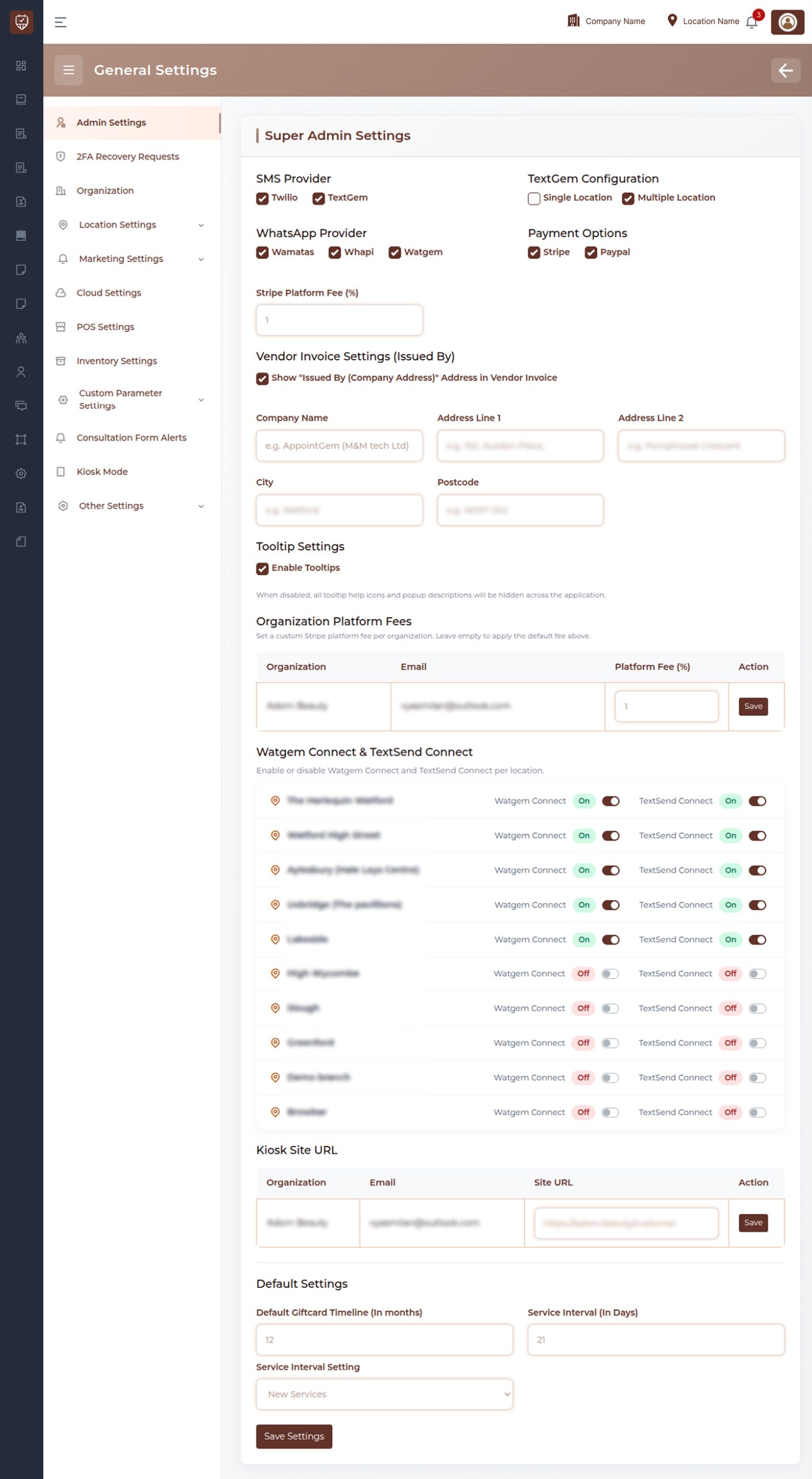
Overview
Super Admin Settings is used to manage shared application configurations.
Administrators can:
- Configure SMS and messaging providers
- Manage payment gateway availability
- Configure invoice information
- Enable tooltip visibility
- Define platform fee settings
- Control external integrations
- Configure kiosk access URLs
- Manage default operational settings
SMS Provider
Allows administrators to select available SMS providers used across the platform.
Supported capabilities include:
- SMS delivery configuration
- Message routing management
- Provider availability control
- Communication channel selection
Changes apply to supported messaging workflows.
Text Configuration
Controls how text communication services are configured.
Available options may include:
Single Configuration
Uses one shared communication configuration.
Multiple Configuration
Allows separate communication configurations where supported.
WhatsApp Provider
Allows configuration of WhatsApp communication services.
Used for:
- Customer notifications
- Appointment communication
- Service messaging
- Automated communication delivery
Only enabled providers are available during message processing.
Payment Options
Allows administrators to enable supported payment gateways.
Used for:
- Online payment processing
- Customer checkout
- Transaction collection
- Payment management
Only enabled payment methods appear during payment operations.
Platform Fee (%)
Defines the platform fee percentage applied during supported transactions.
Used to:
- Calculate platform charges
- Manage settlement amounts
- Control transaction deductions
Platform fees may apply globally unless overridden.
Vendor Invoice Settings (Issued By)
Controls information displayed in generated vendor invoices.
Configuration includes:
- Company information
- Address information
- Invoice issuer details
Optional visibility settings can be enabled where supported.
Company Information
Allows administrators to configure organization details.
Supported fields include:
Company Name
Used as the invoice issuer.
Address Line 1
Primary company address.
Address Line 2
Additional address information.
City
Administrative city information.
Postcode
Postal code used in invoice records.
Tooltip Settings
Controls tooltip visibility across the platform.
Enable Tooltips
When enabled:
- Information icons remain visible
- Helper descriptions appear
- Context guidance becomes available
When disabled:
- Tooltips are hidden across the application
Organization Platform Fees
Allows custom platform fee configuration.
Administrators can:
- Define organization-specific platform fees
- Override default fee percentages
- Save fee updates independently
Used for customized settlement calculations.
Integration Connections
Allows enabling or disabling supported external connections.
Used for:
- Messaging integrations
- Communication services
- Connected workflows
Administrators can manage integration availability individually.
Kiosk Site URL
Allows configuration of the customer kiosk access URL.
Used for:
- Customer self-service access
- Kiosk login entry
- Customer-facing kiosk workflows
Configured URLs determine kiosk availability.
Default Settings
Provides global defaults used across the platform.
Default Giftcard Timeline (In Months)
Defines the default validity period for newly created gift cards.
Used to:
- Control expiration periods
- Standardize gift card policies
Service Interval (In Days)
Defines the default interval used for supported service scheduling.
Used for:
- Service reminders
- Scheduling controls
- Appointment timing logic
Service Interval Setting
Controls how service intervals are applied.
Used to:
- Define interval behavior
- Configure scheduling defaults
- Standardize service timing
Save Settings
Stores all updated configuration values.
Changes become active after successful saving.
Best Practices
- Review provider settings before enabling live usage.
- Verify payment configurations after updates.
- Keep invoice details accurate and maintained.
- Use platform fees consistently across organizations.
- Save and validate configuration changes before deployment.