
Reschedule Booking Settings
The Reschedule Booking Settings page allows administrators to configure appointment rescheduling rules, rescheduling limits, applicable fees, customer notifications, and rescheduling policies. Settings can be applied at either the company level or location level to maintain a consistent appointment management process.
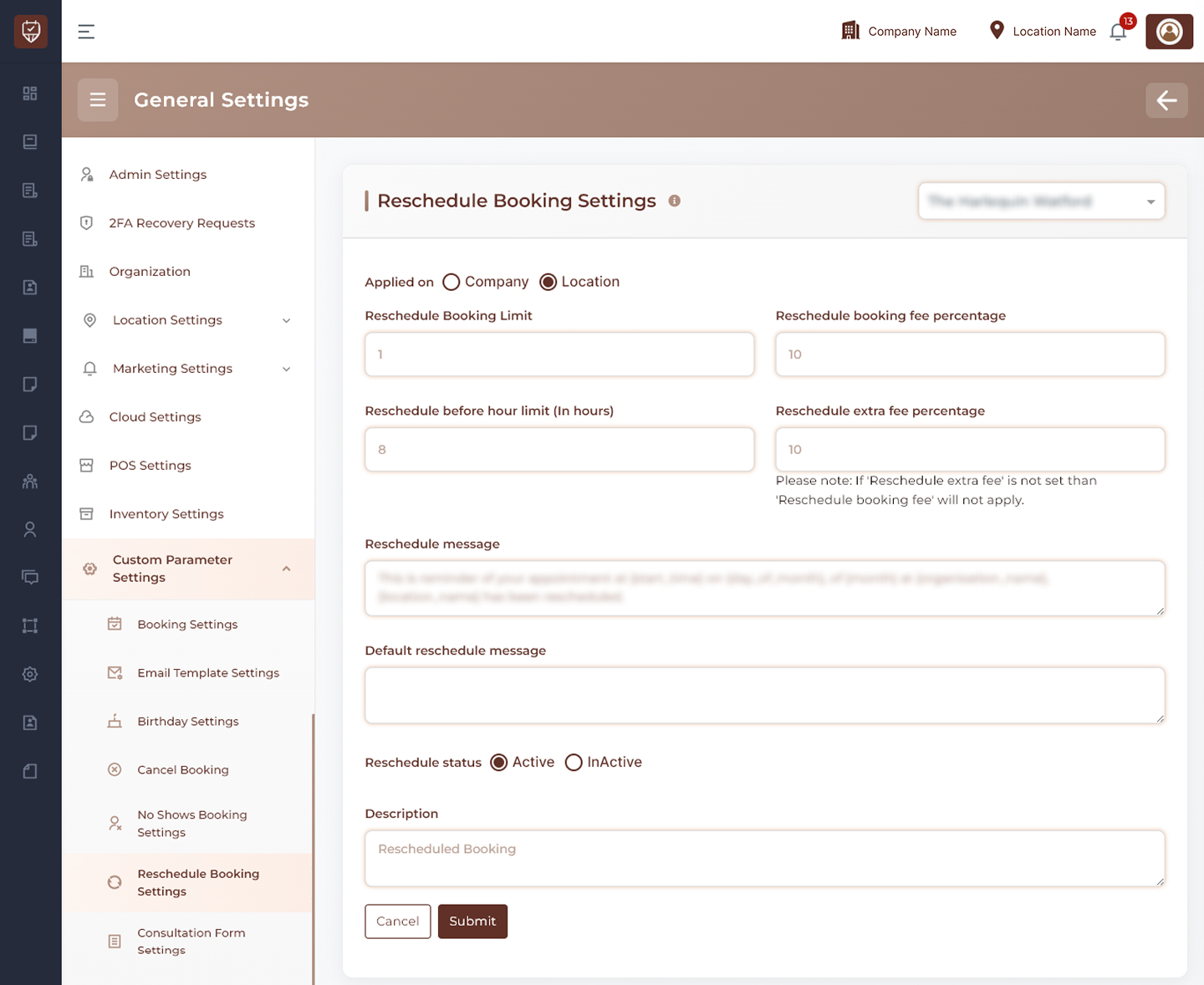
Scope Selection
Choose whether reschedule settings should be applied at:
- Company Level – Applies rescheduling rules across all locations.
- Location Level – Applies rescheduling rules only to the selected location.
Reschedule Limits
Configure restrictions on appointment rescheduling.
Features
- Define how many times an appointment can be rescheduled.
- Control rescheduling availability before the appointment time.
- Establish operational limits for appointment changes.
- Support consistent scheduling policies across the business.
Usage
Rescheduling limits help prevent excessive appointment modifications while maintaining scheduling efficiency.
Reschedule Fee Management
Configure fees associated with appointment rescheduling.
Features
- Define standard rescheduling charges.
- Configure additional fees for specific rescheduling conditions.
- Apply percentage-based rescheduling fees.
- Support business-specific rescheduling policies.
Usage
Reschedule fees can help reduce frequent appointment changes and encourage customers to maintain their original booking schedule.
Customer Communication
Manage notifications sent when appointments are rescheduled.
Features
- Configure customer-facing reschedule messages.
- Create default rescheduling notifications.
- Standardize communication regarding appointment changes.
- Maintain consistent messaging across locations.
Usage
Clear communication helps customers stay informed whenever appointment schedules are updated.
Status Management
Control whether rescheduling functionality is active.
Features
- Enable appointment rescheduling.
- Temporarily disable rescheduling functionality.
- Apply configuration changes immediately after saving.
Usage
Status controls allow administrators to activate or suspend appointment rescheduling according to business requirements.
Description
Provides an internal summary of the configured rescheduling policy.
Features
- Supports internal documentation.
- Helps administrators identify policy purpose.
- Simplifies future maintenance and reviews.
Actions
- Submit : Saves all reschedule booking settings and applies the configured policies.
- Cancel : Discards unsaved changes and restores the current configuration.
Best Practices
- Define reasonable rescheduling limits to prevent scheduling disruptions.
- Clearly communicate rescheduling policies to customers.
- Review fee structures periodically to align with business requirements.
- Ensure notification messages remain accurate and informative.
- Regularly evaluate rescheduling trends to optimize appointment management.