
Customer Icon Settings
The Customer Icon Settings page allows administrators to configure customer achievement levels based on booking activity and spending thresholds. These settings help recognize customer loyalty, encourage repeat bookings, and provide a visual representation of customer engagement within the system.
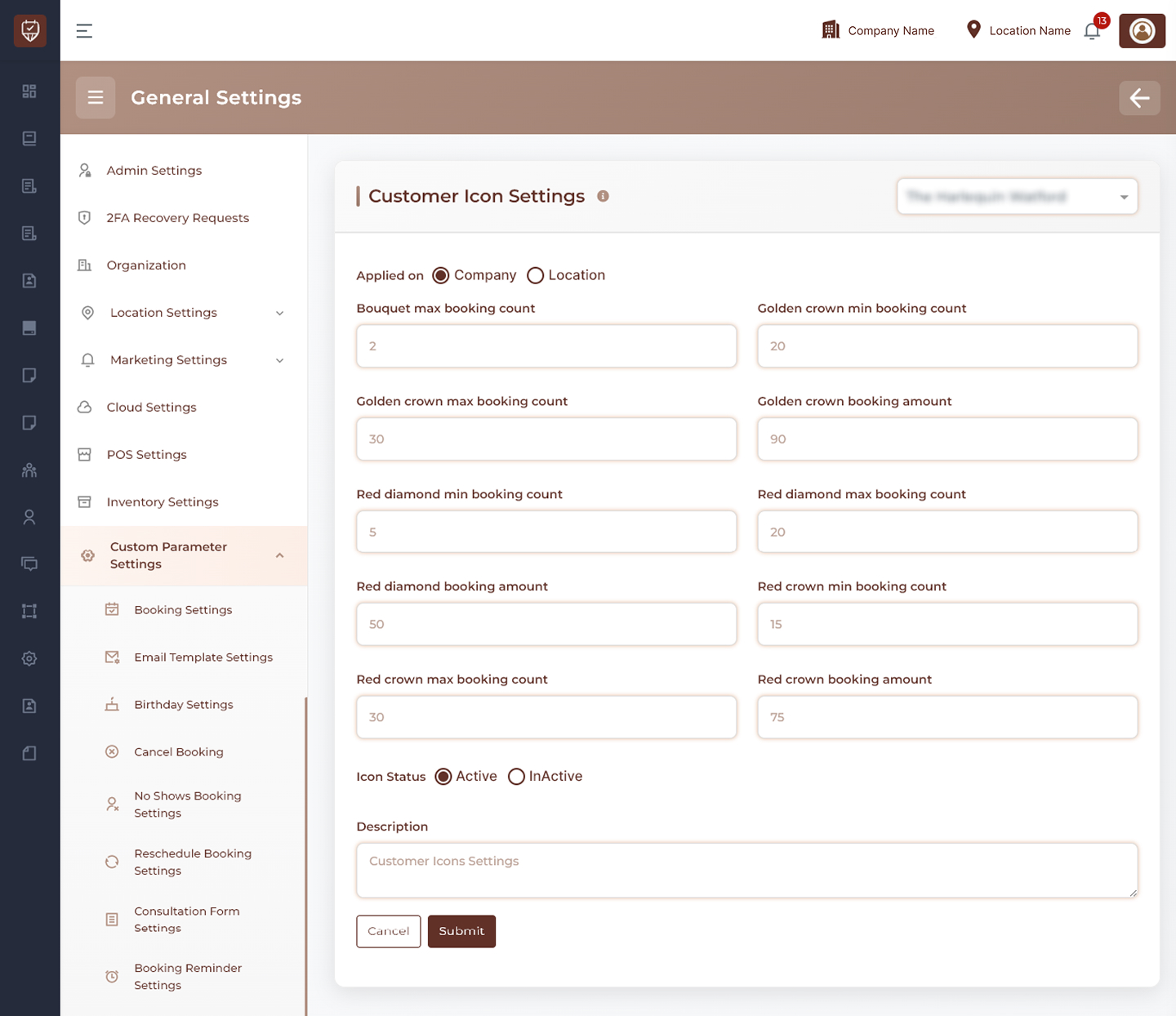
Scope Selection
Choose where the settings should apply:
- Company Level – Applies customer icon settings across all locations.
- Location Level – Applies customer icon settings only to the selected location.
Usage
Use company-level settings when customer achievement criteria should remain consistent across the organization. Use location-level settings when individual locations require customized loyalty thresholds.
Bouquet Level Configuration
Configure the criteria required for customers to achieve the Bouquet icon level.
Features
- Define the maximum booking count for this level.
- Establish the entry-level customer achievement category.
- Support customer progression through loyalty tiers.
- Encourage repeat bookings.
Usage
The Bouquet level is typically used as the introductory achievement tier for new or returning customers.
Golden Crown Level Configuration
Configure the qualification requirements for the Golden Crown achievement level.
Features
- Define minimum booking requirements.
- Define maximum booking limits.
- Configure spending thresholds.
- Reward highly engaged customers.
Usage
Golden Crown levels can be used to identify customers with significant booking activity and spending history.
Blue Diamond Level Configuration
Configure the qualification criteria for the Blue Diamond achievement level.
Features
- Define minimum booking requirements.
- Define maximum booking limits.
- Configure spending thresholds.
- Recognize loyal and active customers.
Usage
Blue Diamond levels provide an additional recognition tier for customers demonstrating continued engagement.
Red Crown Level Configuration
Configure the qualification requirements for the Red Crown achievement level.
Features
- Define minimum booking requirements.
- Define maximum booking limits.
- Configure spending thresholds.
- Reward premium customer loyalty.
Usage
Red Crown levels can be used to recognize customers with exceptional booking activity and long-term engagement.
Icon Status Management
Control whether customer achievement icons are active.
Features
- Enable customer icon assignments.
- Disable icon assignments temporarily.
- Preserve configuration settings while inactive.
- Activate achievement tracking when required.
Usage
Status controls provide flexibility when managing customer recognition programs.
Description
Provide an internal summary of the customer icon configuration.
Features
- Supports administrative documentation.
- Helps identify loyalty tier policies.
- Assists with future maintenance and auditing.
- Provides context for administrators reviewing settings.
Usage
Descriptions are intended for internal reference and are not visible to customers.
Actions
- Submit : Saves all customer icon settings and applies the configured achievement criteria.
- Cancel : Discards unsaved changes and restores the current configuration.
Best Practices
- Define clear progression paths between customer achievement levels.
- Regularly review booking and spending thresholds to align with business goals.
- Use achievement tiers to encourage customer loyalty and repeat visits.
- Keep qualification criteria consistent and easy to understand.
- Periodically evaluate customer engagement data to optimize loyalty tiers.