
Customer Reward Settings
The Customer Reward Settings page allows administrators to configure a loyalty reward system that awards points to customers based on their spending. These settings help encourage repeat visits, increase customer engagement, and support long-term customer retention through a structured rewards program.
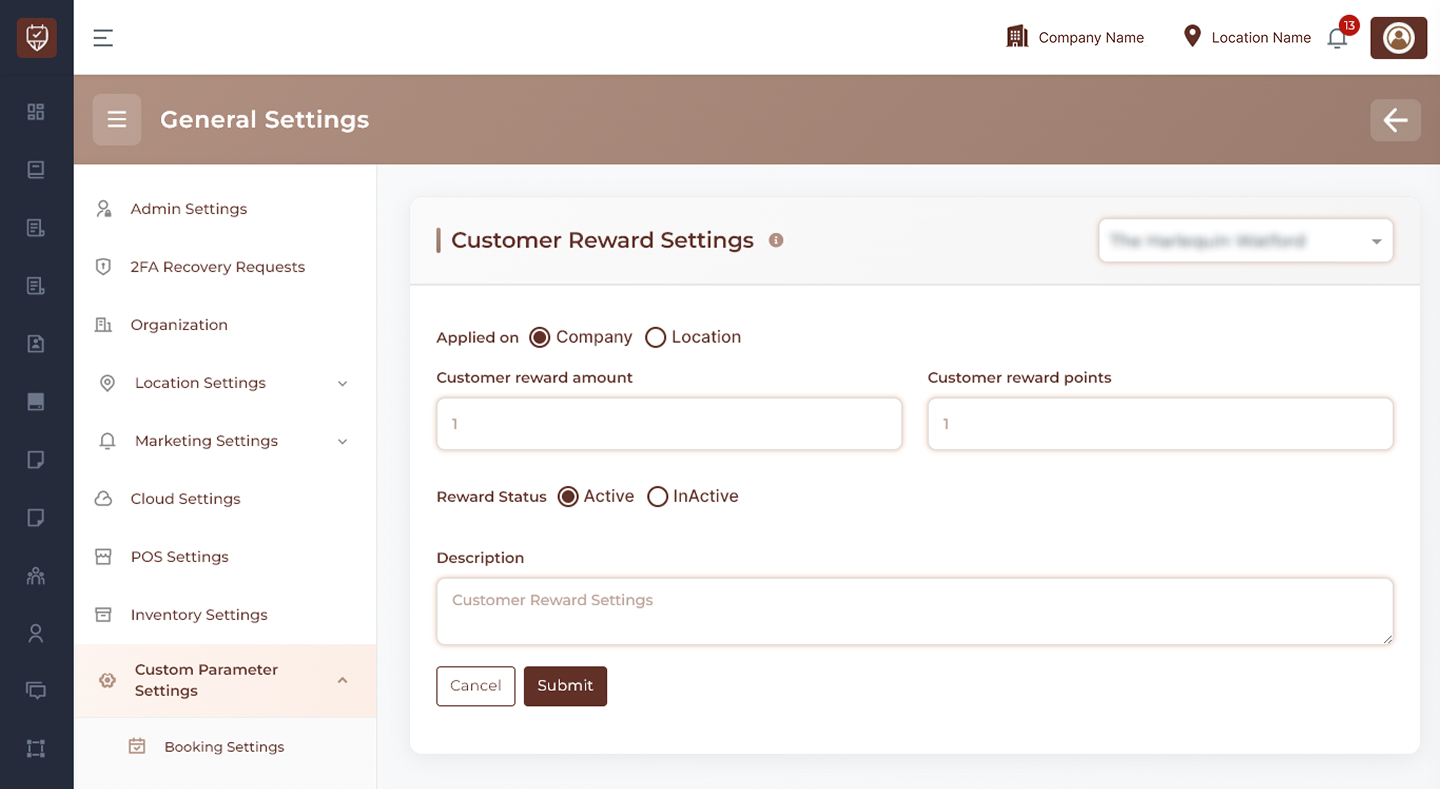
Scope Selection
Choose where the reward settings should apply:
- Company Level – Applies reward settings across all locations.
- Location Level – Applies reward settings only to the selected location.
Usage
Use company-level settings to maintain a consistent loyalty program across the organization. Use location-level settings when individual locations require different reward structures.
Customer Reward Amount
Defines the spending amount required for reward point allocation.
Features
- Sets the spending threshold for earning rewards.
- Supports flexible loyalty program configurations.
- Helps standardize customer reward calculations.
- Encourages increased customer spending.
Usage
Specify the amount a customer must spend before reward points are granted according to the configured reward ratio.
Customer Reward Points
Defines the number of reward points awarded when the configured spending amount is reached.
Features
- Controls point distribution within the loyalty program.
- Supports customizable reward structures.
- Encourages repeat purchases and appointments.
- Helps increase customer retention.
Usage
Configure the number of points customers receive for qualifying purchases or transactions.
Reward Status
Controls whether the customer reward program is active.
Features
- Enable or disable reward point calculations.
- Temporarily suspend loyalty rewards without removing settings.
- Maintain reward configuration for future use.
- Control participation in the rewards program.
Usage
Set the status to Active to allow customers to earn reward points. Set it to Inactive when rewards should not be issued.
Description
Provides an internal explanation of the customer reward configuration.
Features
- Supports administrative documentation.
- Helps explain reward program rules.
- Assists with future maintenance and audits.
- Provides context for administrators.
Usage
Enter a brief description outlining how the reward system is intended to operate.
Actions
- Submit : Saves all customer reward settings and applies the configured loyalty program rules.
- Cancel : Discards unsaved changes and restores the current configuration.
Best Practices
- Keep reward calculations simple and easy for customers to understand.
- Ensure reward points provide meaningful value to encourage participation.
- Regularly review reward ratios to align with business objectives.
- Monitor customer engagement and adjust reward structures when necessary.
- Clearly communicate reward benefits to customers.