
Quick SMS Logs
The Quick SMS Logs page provides a record of instantly sent SMS messages such as reminders, quick updates, alerts, or customer communication messages. It helps track sent content, delivery activity, and communication history.
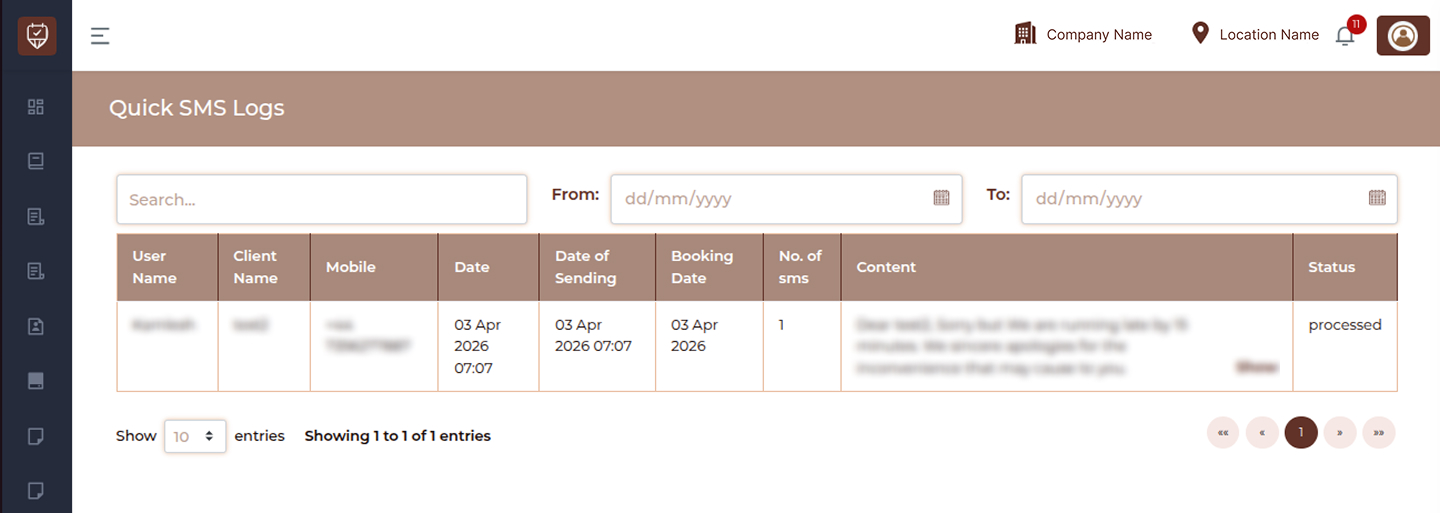
Filters & Controls
Search
Use the search bar to quickly find SMS records using customer name, mobile number, or message content.
Date Filters
- From : Select the start date to view logs from a specific date range.
- To : Select the end date to filter logs up to the selected date.
Table Overview
User Name
Displays the staff member or system user who triggered the SMS.
Client Name
Shows the name of the customer who received the SMS.
Mobile
Displays the recipient mobile number.
Date
Shows the date and time when the SMS record was created.
Date of Sending
Displays the exact date and time when the SMS was sent.
Booking Date
Shows the related booking date if the SMS is linked to an appointment.
No. of sms
Displays the number of SMS units consumed for the message.
Content
Shows the SMS message content. Use Show to view the complete message if truncated.
Status
Displays the current status of the SMS.
Examples:
- Processed
- Sent
- Delivered
- Failed
Best Practices
- Use filters to review messages by date
- Monitor failed or pending SMS records
- Review communication history for appointments
- Verify content before sending bulk quick messages
- Keep logs for operational tracking