
Consultation Form Settings
The Consultation Form Settings page allows administrators to configure consultation and record form behaviour across the system. These settings help standardize customer information collection, improve record management, and ensure consistency across all locations.
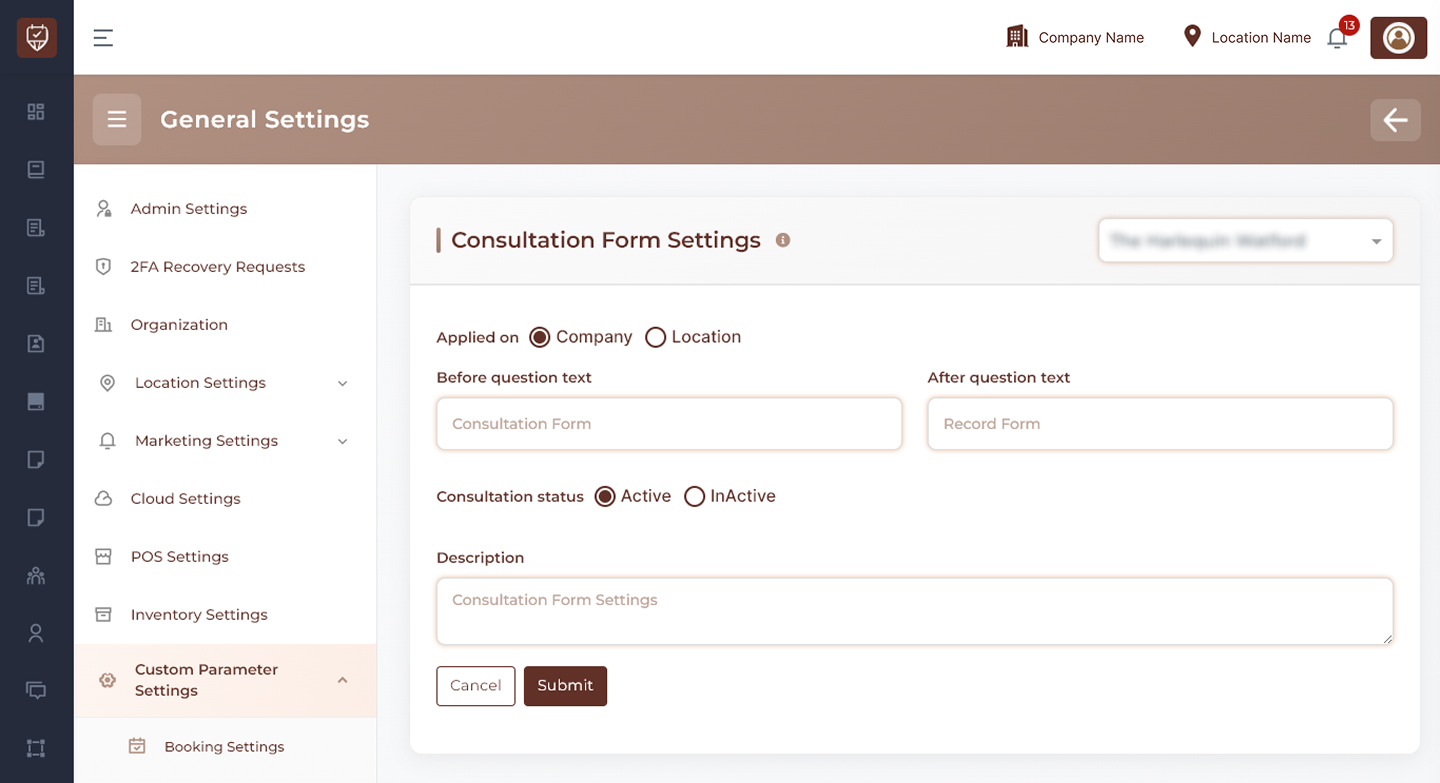
Scope Selection
Choose where the settings should apply:
- Company Level – Applies the configuration across all locations.
- Location Level – Applies the configuration only to the selected location.
Usage
Use company-level settings when all locations follow the same consultation process. Use location-level settings when individual locations require different consultation or record form workflows.
Consultation Form Configuration
Configure how consultation forms are presented within the system.
Features
- Define a custom consultation form name.
- Maintain consistent terminology across customer and staff interfaces.
- Support business-specific consultation processes.
- Improve form identification and usability.
Usage
Custom labels help align consultation forms with your organization’s terminology and operational requirements.
Record Form Configuration
Manage how customer record forms are identified and displayed.
Features
- Define a custom record form name.
- Standardize record-keeping terminology.
- Improve staff understanding of customer records.
- Support customized business workflows.
Usage
Clear form naming helps employees quickly identify the correct form type during customer interactions.
Consultation Status Management
Control whether consultation forms are available for use.
Features
- Enable consultation forms for customer and staff use.
- Temporarily disable consultation forms when required.
- Apply changes immediately after saving.
Usage
Status controls provide flexibility when updating forms or modifying consultation procedures.
Record Form Prefill Settings
Control whether previous customer responses are automatically reused.
Features
- Automatically populate record forms using previous customer responses.
- Reduce repetitive data entry for returning customers.
- Improve efficiency during consultations.
- Maintain consistency across customer records.
Usage
When enabled, previously recorded customer information can be reused to streamline future visits and reduce administrative effort.
Description
Provide an internal summary of the consultation form configuration.
Features
- Supports administrative documentation.
- Helps identify the purpose of specific configurations.
- Assists future maintenance and audits.
Usage
Descriptions are intended for internal reference and do not affect customer-facing forms.
Actions
- Submit : Saves all consultation form settings and applies the configuration.
- Cancel : Discards unsaved changes and restores the current configuration.
Best Practices
- Use clear and consistent form names across the organization.
- Enable automatic prefill only when it aligns with your data collection policies.
- Regularly review consultation processes to ensure forms remain relevant.
- Keep consultation settings standardized whenever possible.
- Use descriptions to document the purpose of configuration changes.