
Customer Gift Cards
The Customer Gift Cards page allows you to manage all gift cards issued to customers. It helps you track gift card usage, validity, redemption status, and customer details in one place.
This module allows you to:
- View all issued gift cards
- Track expiry and usage status
- Manage gift card redemption
- Filter and search gift cards easily
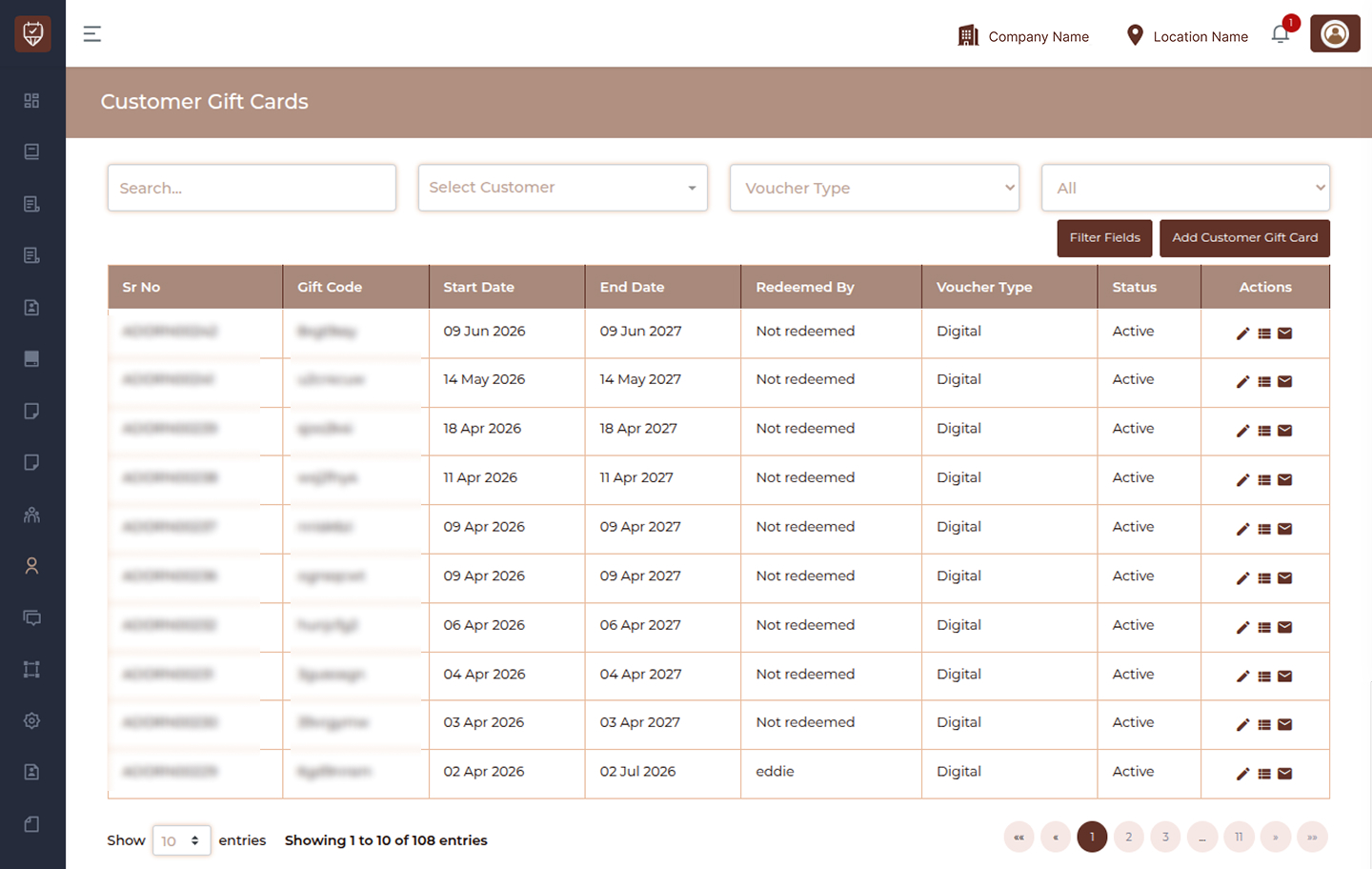
Overview
The listing page displays all customer gift cards in a structured table with filtering options to quickly find specific records.
Filters
Search
Use the search field to find gift cards by code, customer, or related details.
Select Customer
Filter gift cards for a specific customer.
Voucher Type
Filter gift cards based on voucher type such as Digital or other available types.
Status
Filter gift cards based on their status such as Active or other states.
Filter Fields
Apply selected filters to refine the gift card list.
Add Customer Gift Card
Create and assign a new gift card to a customer.
Table Columns
Sr No
Displays the unique reference number of the gift card.
Gift Code
Shows the unique code associated with the gift card.
Start Date
Displays the date from which the gift card becomes valid.
End Date
Shows the expiry date of the gift card.
Redeemed By
Indicates the customer who has used or redeemed the gift card.
Voucher Type
Displays the type of voucher such as Digital.
Status
Shows the current status of the gift card.
- Active → Gift card is valid and usable
Actions
Provides options to manage gift cards such as edit, view, extend, or send.
Edit
Modify gift card details.
View
Open and review gift card details.
Extend
Extend the validity period of the gift card.
Send / Email
Send the gift card to the customer via email.
More Options
Access additional actions related to gift card management.
Best Practices
- Regularly monitor gift card expiry dates
- Ensure correct voucher type is selected during creation
- Use filters to quickly locate specific gift cards
- Extend validity only when required
- Verify redemption details before making changes
Add / Edit Customer Gift Card
The Add / Edit Customer Gift Card page allows you to create or update gift cards for customers. It helps define voucher type, value, validity, services, and delivery details in a structured way.
This page ensures proper setup of gift cards for both digital and physical usage.
This module allows you to:
- Create new gift cards for customers
- Define voucher type and validity
- Assign services or monetary value
- Manage billing and delivery details
- Generate unique gift card codes
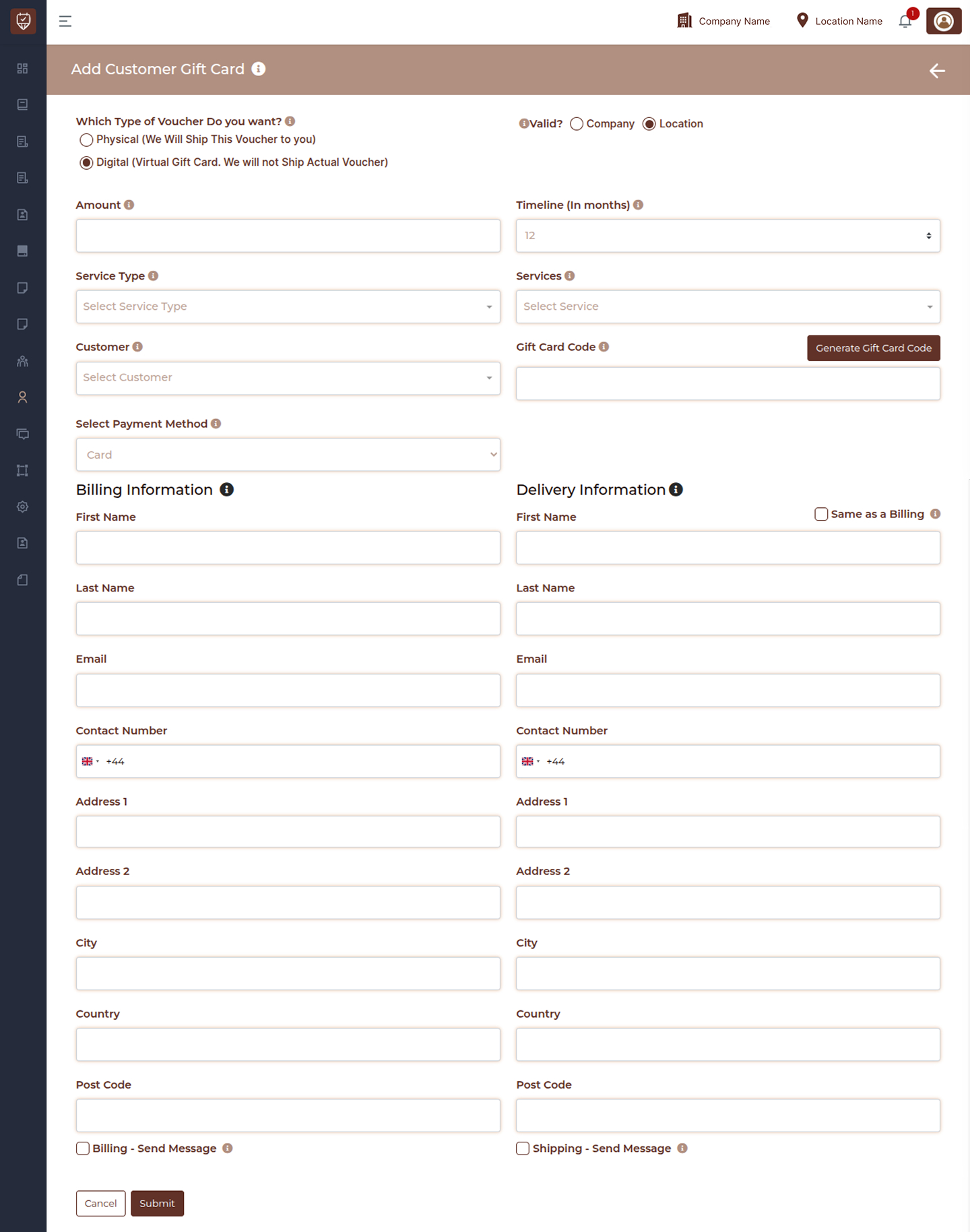
Voucher Details
Which Type of Voucher Do you want
Select the type of gift card.
- Physical → Voucher will be shipped to the customer
- Digital → Virtual gift card, no physical shipping
Valid
Select where the gift card can be used.
- Company → Valid across all locations
- Location → Valid only for a specific branch
Amount
Enter the monetary value of the gift card.
Timeline (In months)
Define the validity duration of the gift card in months.
Service Type
Select the category of services linked to the gift card.
Services
Select specific services that can be redeemed using the gift card.
Customer
Choose the customer to whom the gift card will be assigned.
Gift Card Code
Enter or generate a unique code for the gift card.
Generate Gift Card Code
Click to automatically generate a unique gift card code.
Select Payment Method
Choose how the gift card was purchased.
Billing Information
This section captures the billing details of the purchaser.
First Name
Enter the first name of the customer.
Last Name
Enter the last name of the customer.
Enter the email address for billing communication.
Contact Number
Enter the phone number with country code.
Address 1
Enter the primary billing address.
Address 2
Enter additional address details if required.
City
Enter the city name.
Country
Enter the country.
Post Code
Enter the postal or ZIP code.
Billing - Send Message
Enable to send gift card details or confirmation via billing contact.
Delivery Information
This section captures delivery details for the gift card.
Same as Billing
Select this option to copy billing details into delivery fields.
First Name
Enter recipient’s first name.
Last Name
Enter recipient’s last name.
Enter recipient’s email address.
Contact Number
Enter recipient’s phone number.
Address 1
Enter delivery address.
Address 2
Enter additional delivery details if required.
City
Enter the delivery city.
Country
Enter the delivery country.
Post Code
Enter the delivery postal code.
Shipping - Send Message
Enable to send gift card details to the recipient.
Actions
Cancel
Discard changes and return to the previous page.
Submit
Save the gift card details and activate it.
Best Practices
- Always verify voucher type before creating the gift card
- Ensure correct validity duration is set
- Use generated codes to avoid duplication
- Double-check billing and delivery details
- Select appropriate services if the voucher is service-based
- Use messaging options to notify customers or recipients
Customer Gift Card Details
The Customer Gift Card Details page provides a complete overview of a specific gift card, including its value, validity, redemption details, and transaction history.
This page helps track how a gift card is used, who redeemed it, and all related financial activities, ensuring transparency and accurate record keeping.
This module allows you to:
- View complete gift card information
- Track remaining balance and usage
- Monitor redemption details
- Review transaction history
- Audit gift card activity
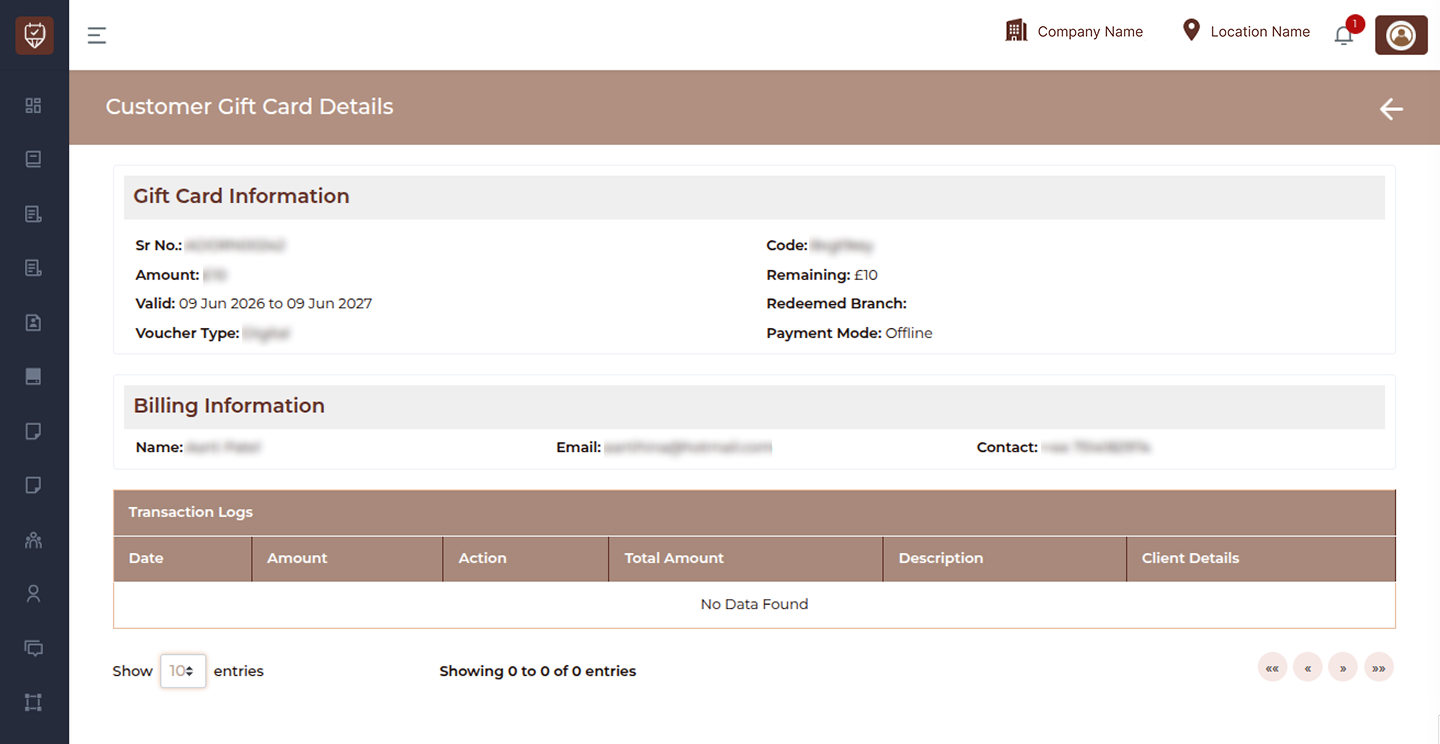
Gift Card Information
Sr No
Displays the unique reference number assigned to the gift card.
Amount
Shows the total value of the gift card.
Valid
Displays the validity period (start date to expiry date).
Voucher Type
Indicates whether the gift card is digital or physical.
Code
Displays the unique gift card code used for redemption.
Remaining
Shows the remaining balance available on the gift card.
Redeemed Branch
Indicates the branch or location where the gift card was used.
Payment Mode
Displays how the gift card was purchased (e.g., online or offline).
Billing Information
Name
Displays the name associated with the billing details.
Shows the billing email address.
Contact
Displays the contact number linked to the billing information.
Redeem Information
Customer Name
Displays the name of the customer who redeemed the gift card.
Customer Email
Shows the email address of the customer who used the gift card.
Customer Mobile
Displays the contact number of the customer.
Redeemed Branch
Indicates where the gift card redemption took place.
Transaction Logs
This section records all activities related to the gift card, including usage and balance updates.
Date
Shows the date of each transaction.
Amount
Displays the amount involved in the transaction.
Action
Indicates the type of transaction.
- Credit → Amount added or returned
- Debit → Amount used or deducted
Total Amount
Shows the updated balance after each transaction.
Description
Provides details about the transaction, such as usage or redemption type.
Client Details
Displays the details of the customer involved in the transaction.
Best Practices
- Regularly review transaction logs for accuracy
- Monitor remaining balance to avoid misuse
- Verify redemption details for audit purposes
- Ensure gift card validity dates are properly configured
- Track debit and credit entries for financial clarity