
Patch Test Bookings
The Patch Test Bookings page allows you to view and manage all patch test appointments scheduled for services that require allergy or sensitivity testing. It helps ensure safety compliance before performing treatments.
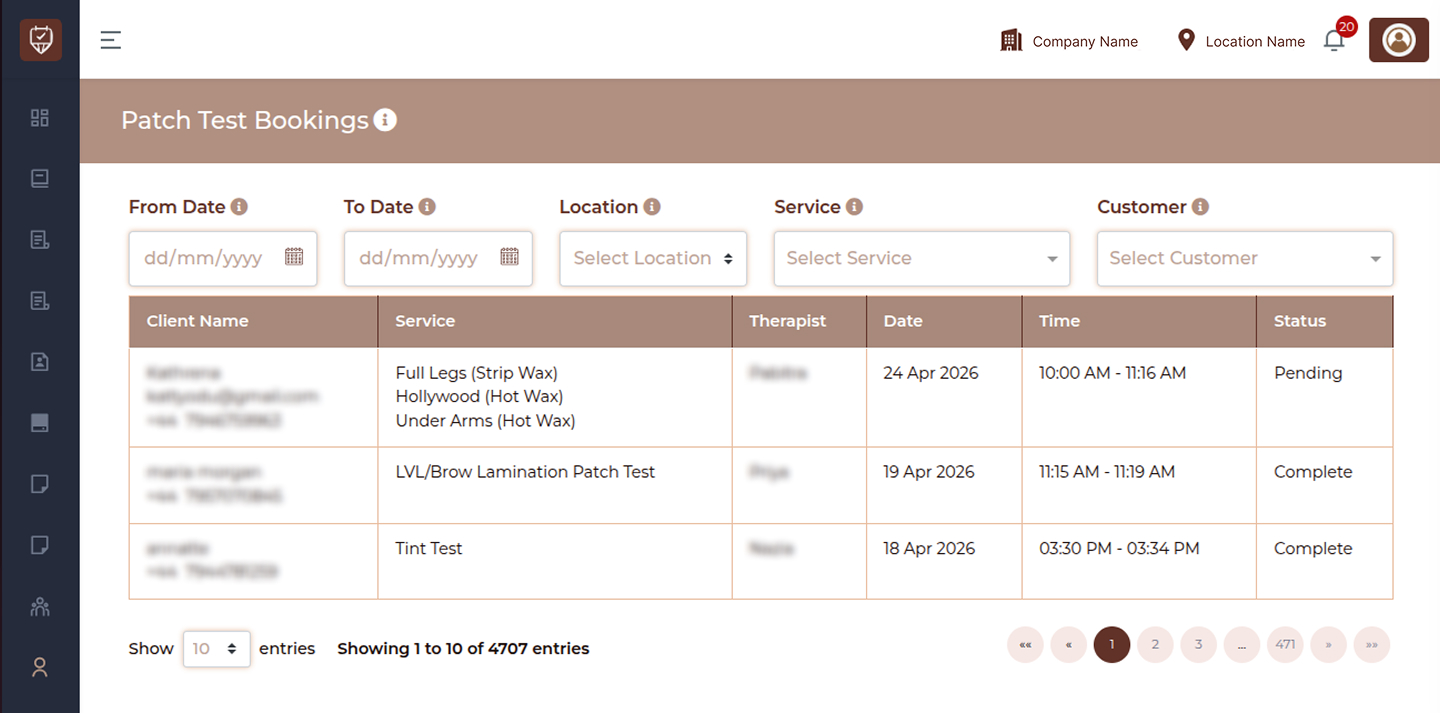
Overview
This page helps you:
- Track all patch test bookings
- Filter records based on date, location, service, or customer
- Monitor completion status of patch tests
Filters
Use the filters at the top of the page to quickly find specific patch test records.
From Date
Select a start date to view patch test bookings from that date onward.
To Date
Select an end date to view patch test bookings up to that date.
Location
Filter bookings based on a specific branch or location. This helps in managing patch tests across multiple locations.
Service
Filter patch test bookings by service type. Examples include:
- Tint Test
- Lash Glue Test
- Brow Patch Test
Customer
Select a customer to view their specific patch test bookings.
Patch Test Table
The table displays all patch test booking records in a structured format.
Columns Overview
Client Name
Displays customer-related details including:
- Name
- Email address
- Contact number
Service
Shows the service for which the patch test was conducted.
Therapist
Indicates the therapist who performed the patch test.
Date
Displays the date when the patch test was carried out.
Time
Shows the time duration of the patch test appointment.
Status
Indicates the current status of the patch test.
- Complete → Patch test has been successfully completed
Best Practices
- Always ensure patch tests are completed before certain services
- Use date filters for quick tracking
- Monitor status to avoid incomplete test cases
- Maintain accurate records for compliance