
No Shows Booking Settings
The No Shows Booking Settings page allows administrators to configure policies and actions for appointments where customers do not attend without prior cancellation. Settings can be applied at either the company level or location level to ensure consistent handling of missed appointments.
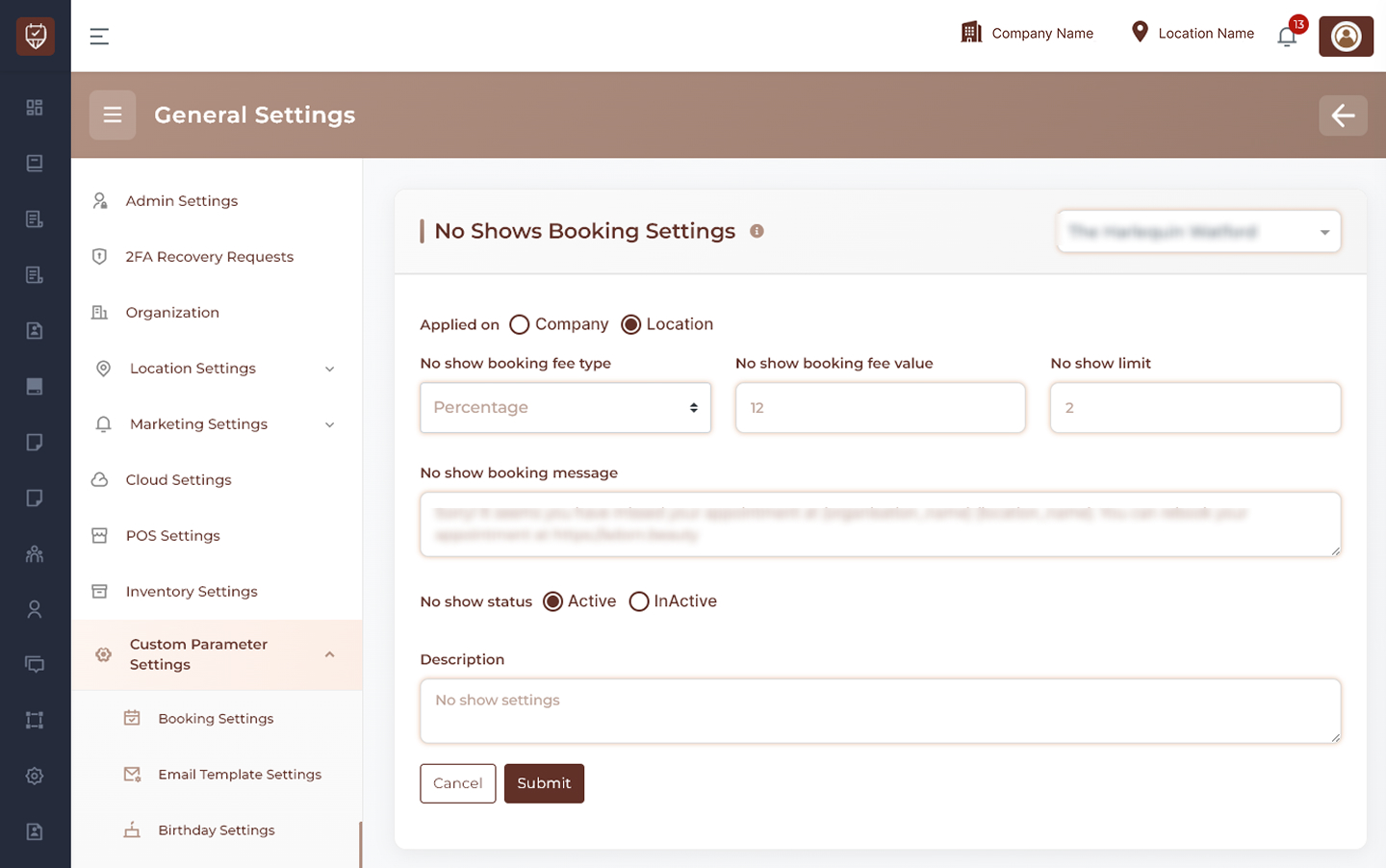
Scope Selection
Choose whether no-show settings should be applied at:
- Company Level – Applies no-show policies across all locations.
- Location Level – Applies no-show policies only to the selected location.
No Show Fee Configuration
Configure charges that may be applied when a customer fails to attend a scheduled appointment.
Features
- Define the no-show fee calculation method.
- Configure the no-show fee amount.
- Apply financial penalties for missed appointments.
- Support business-specific no-show management policies.
Usage
No-show fees can help reduce missed appointments and encourage customers to manage bookings responsibly.
No Show Limits
Configure restrictions related to repeated no-show occurrences.
Features
- Define the maximum allowed number of no-show incidents.
- Monitor repeated missed appointments.
- Support automated enforcement of booking policies.
Usage
No-show limits help businesses identify customers with repeated attendance issues and manage future booking eligibility.
Customer Communication
Manage notifications sent when an appointment is marked as a no-show.
Features
- Configure customer-facing no-show messages.
- Standardize communication after missed appointments.
- Provide information about future booking options or business policies.
- Maintain consistent messaging across locations.
Usage
Clear communication helps customers understand the impact of missed appointments and any applicable business policies.
Status Management
Control whether no-show processing is active.
Features
- Enable no-show tracking and enforcement.
- Disable no-show policies when not required.
- Apply configuration changes immediately after saving.
Usage
Status controls allow administrators to activate or temporarily suspend no-show management procedures.
Description
Provides an internal summary of the configured no-show policy.
Features
- Supports internal documentation.
- Helps administrators understand the purpose of the configuration.
- Simplifies future maintenance and policy reviews.
Actions
- Submit : Saves all no-show booking settings and applies the configured policies.
- Cancel : Discards unsaved changes and restores the current configuration.
Best Practices
- Establish fair no-show policies that align with business requirements.
- Review no-show limits periodically.
- Communicate no-show policies clearly to customers.
- Monitor recurring no-show patterns and adjust policies when necessary.
- Keep customer communications professional and informative.