
Customer Loyalty Card
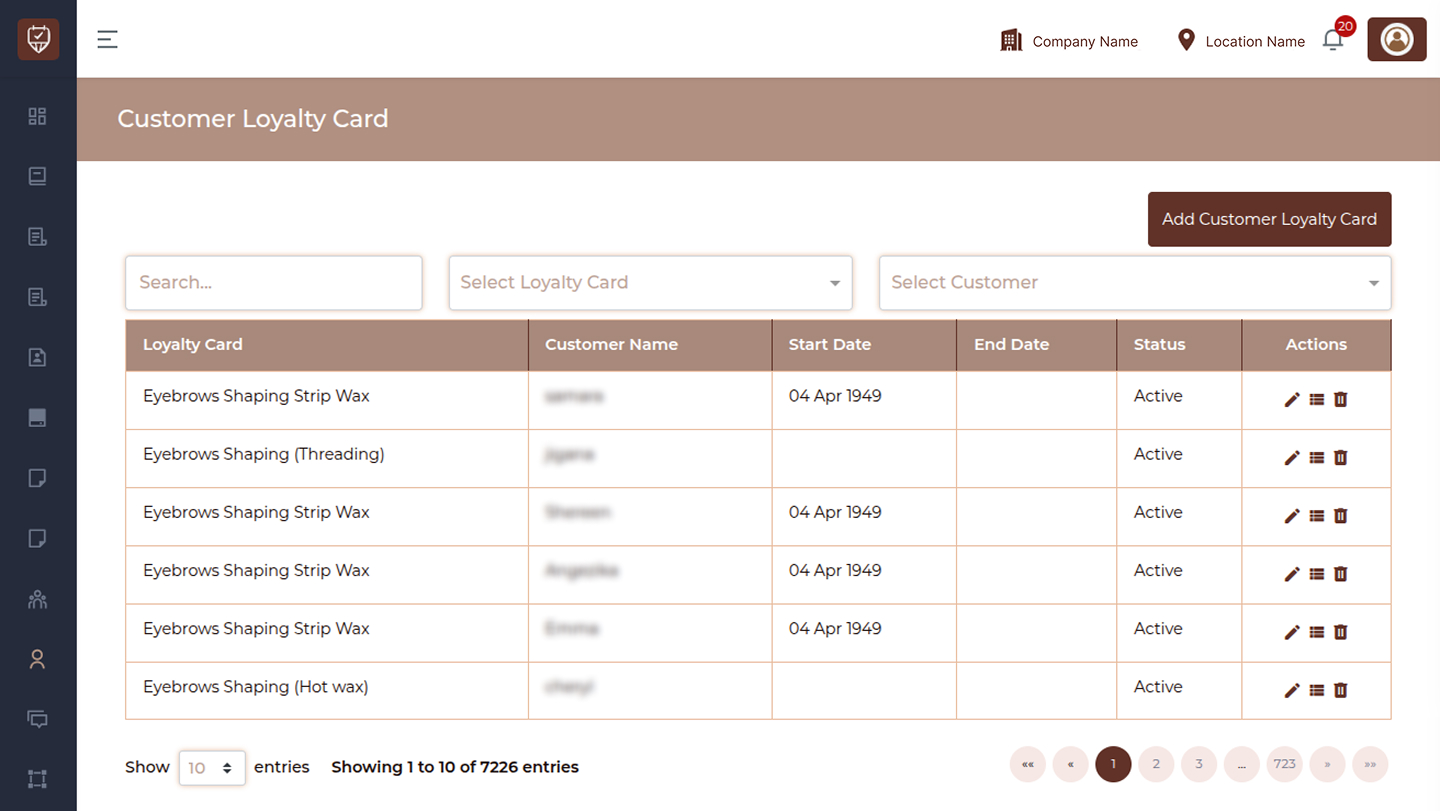
The Customer Loyalty Card page allows you to manage loyalty programs assigned to customers. It helps track loyalty card usage, validity periods, and customer participation in reward-based services. This page is useful for maintaining customer engagement and encouraging repeat visits through loyalty benefits.
Overview
This page provides:
- Loyalty card filtering options
- List of assigned loyalty cards
- Quick actions to manage loyalty entries
Search Bar
Use the search field to quickly find loyalty card records. You can search by:
- Loyalty card name
- Customer name
This helps in quickly locating specific records.
Select Loyalty Card
Filter records based on a specific loyalty card.
- Displays available loyalty card options
- Helps identify customers associated with a particular loyalty program
Select Customer
Filter loyalty cards assigned to a specific customer.
- Displays list of customers
- Useful for reviewing loyalty participation for an individual
Add Customer Loyalty Card
Located at the top-right. Click this button to assign a new loyalty card to a customer.
Loyalty Card
Displays the name of the loyalty card or service.
Customer Name
Shows the assigned customer.
Start Date
Indicates when the loyalty card becomes active.
End Date
Displays the expiry or validity end date.
Status
Indicates the current state of the loyalty card.
- Active → Card is currently valid and usable
- Inactive → Card is paused or expired
Actions
Each record includes action icons for quick management.
Edit
Allows you to modify loyalty card details.
- Update validity dates
- Change assigned customer or details
View
Opens detailed information about the loyalty card.
- Review usage or benefits
- Check full loyalty details
Delete
Removes the loyalty card from the system.
- Use with caution — this action may remove associated records
- It may not be reversible
Best Practices
- Keep loyalty records updated
- Regularly review expiry dates
- Use filters for faster navigation
- Avoid deleting records unless necessary
- Monitor active loyalty cards for engagement
Edit Customer Loyalty Card
This section allows you to update an existing loyalty card.
Customer
Select the customer to whom the loyalty card is assigned. If the customer is not available, you can quickly add a new one from this section.
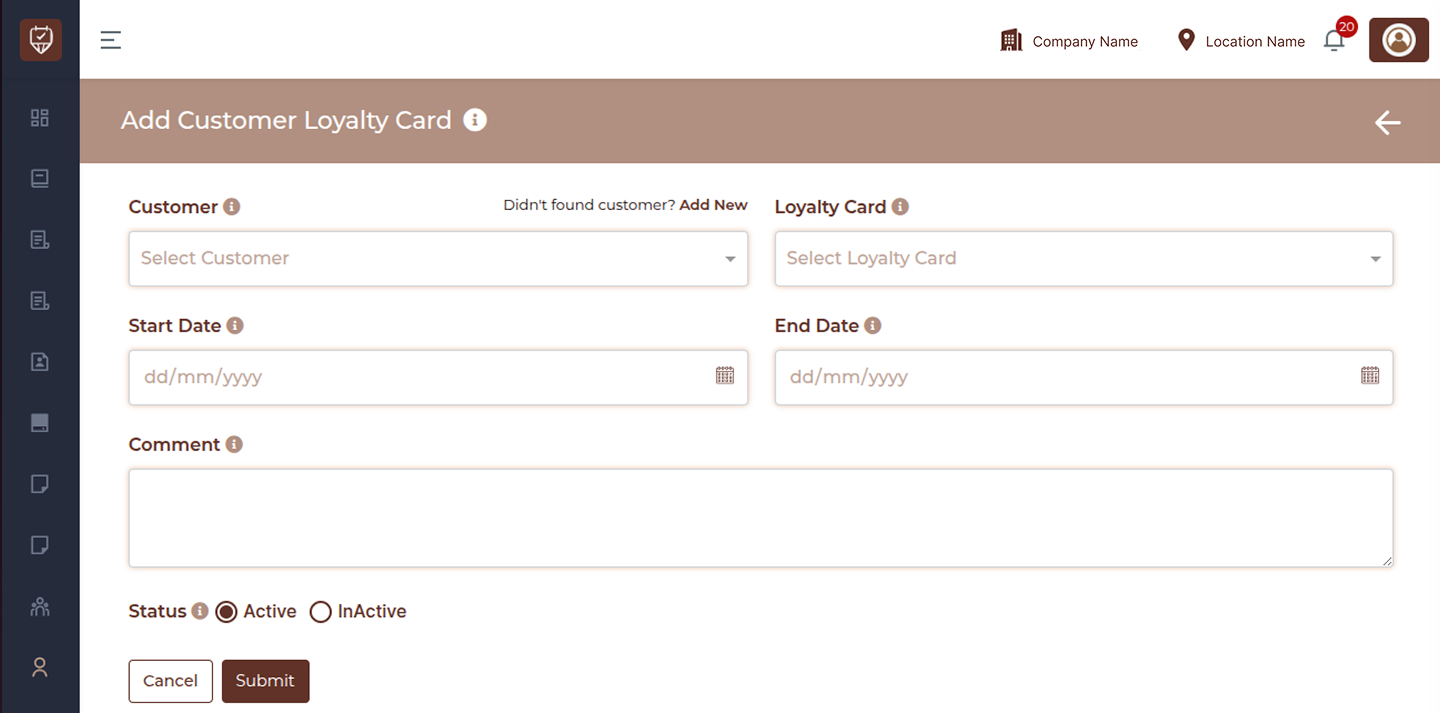
Loyalty Card
Displays the selected loyalty card. This defines the service or benefit included in the loyalty program.
Start Date
Set the date from which the loyalty card becomes active and can be used.
End Date
Set the expiry date after which the loyalty card will no longer be valid.
Comment
Add internal notes related to the loyalty card. This helps in tracking special instructions or additional information.
Status
Choose the current status of the loyalty card:
- Active → Card can be used for bookings
- Inactive → Card cannot be used
Actions
- Submit → Save the changes made to the loyalty card
- Cancel → Exit without saving changes
Loyalty Card Log
This section shows how the loyalty card has been used.
- Number indicators represent service usage slots
- These help track how many services are used and how many are remaining
- Each entry reflects a service usage linked to a booking
Log Table
- Booking ID → Reference of the appointment
- Consumed → Shows whether the service has been used
- Date → Shows when the service was used
Name
Shows the name of the loyalty card or service.
Service Type
Displays the category of the service.
Services
Lists all services included in the loyalty card.
Paid Service Count
Shows how many paid services are included.
Free Service Count
Displays any additional complimentary services.
Recurring Service Count
Indicates how many services repeat within the plan.
Description
Provides additional details about the loyalty card.
Status
- Active → Card is currently usable
- Inactive → Card is not usable
User Information
This section shows basic details related to the customer.
- Full Name
- Phone
- Gender
- Date of Birth
- Anniversary Date
Best Practices
- Always verify start and end dates before saving
- Keep comments clear and relevant
- Regularly check service usage
- Keep loyalty cards active only when valid