
Services Category Report
The Services Category report provides visibility into service performance grouped by category during the selected reporting period. It helps analyse sales trends, monitor refunds, and evaluate overall service revenue performance.
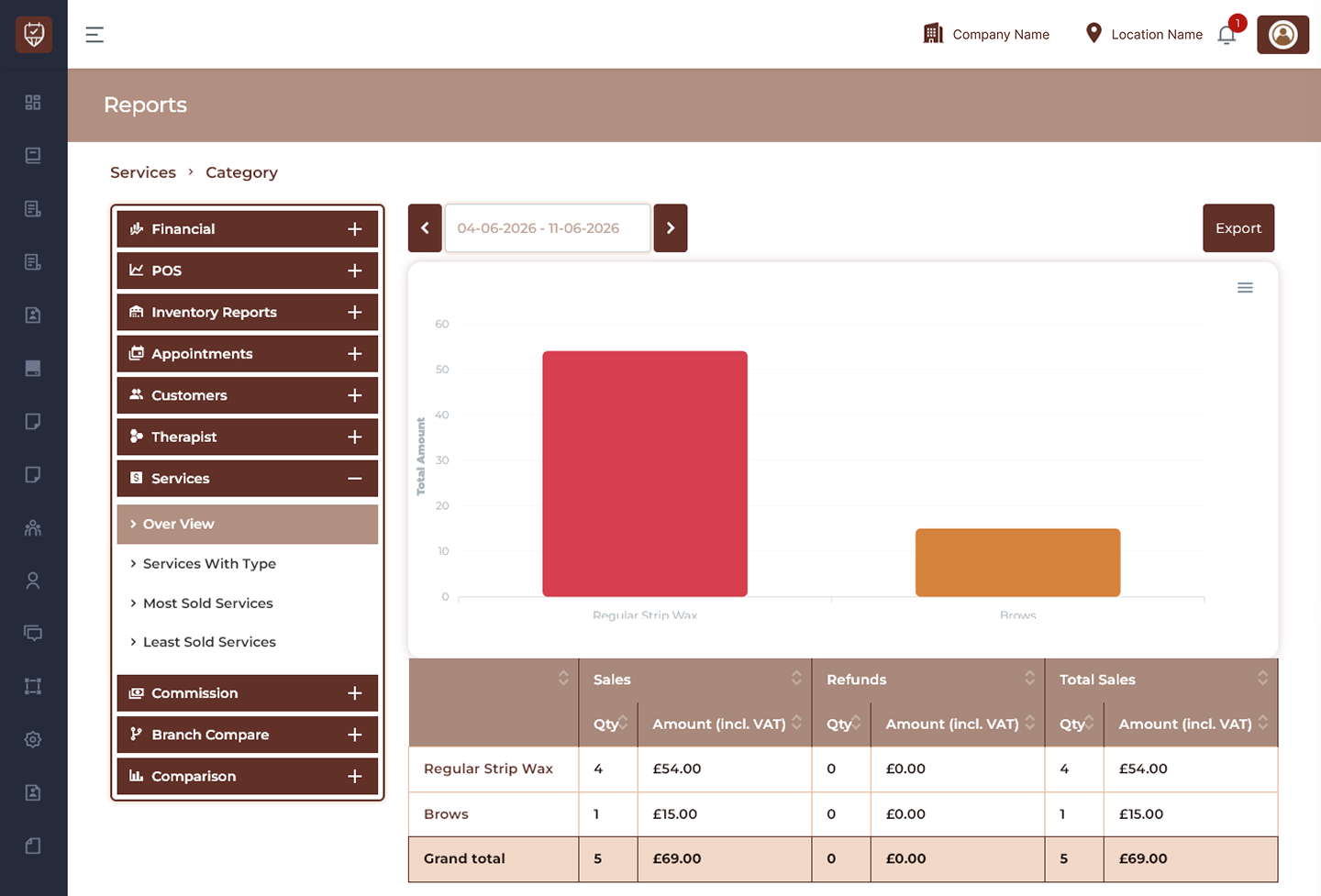
Date Range Filter
Allows users to display service category performance for a selected reporting period.
Features
- Filter service data by date range.
- Review category-wise sales activity.
- Monitor revenue trends.
- Improve reporting visibility.
Purpose
Used to analyse service category performance over a selected period.
Performance Chart
Displays graphical representation of service category performance.
Features
- Visualise category sales amounts.
- Compare category performance.
- Identify top-performing categories.
- Improve operational insights.
Purpose
Used to analyse service revenue visually.
Export
Downloads the currently displayed report.
Features
- Export service category reports.
- Support offline analysis.
- Maintain reporting history.
- Simplify business review.
Purpose
Creates a downloadable services category report.
Service Category Details
Displays service performance grouped by category.
Category Name
Displays the service category name.
Examples:
- Regular Strip Wax
- Lycon Hot Wax
- Brows
- Lash Lift
Features
- Group services by category.
- Improve reporting organisation.
- Simplify category analysis.
Purpose
Used to review category-level performance.
Sales Section
Displays completed service sales information.
Qty
Displays total quantity of services sold.
Amount (incl. VAT)
Displays total sales value including VAT.
Features
- Track service demand.
- Monitor sales performance.
- Measure revenue contribution.
Purpose
Used to evaluate category sales activity.
Refunds Section
Displays refunded service information.
Qty
Displays total refunded transactions.
Amount (incl. VAT)
Displays total refunded amount including VAT.
Features
- Monitor refund activity.
- Analyse service reversals.
- Reduce revenue leakage.
Purpose
Used to review category refund performance.
Total Sales Section
Displays final performance after sales and refunds.
Qty
Displays final service quantity.
Amount (incl. VAT)
Displays total generated amount including VAT.
Features
- Compare actual performance.
- Measure revenue outcomes.
- Improve business reporting.
Purpose
Used to evaluate final category performance.
Summary Section
Grand Total
Displays:
- Total services sold.
- Total refunded quantity.
- Combined revenue amount.
- Final sales value including VAT.
Features
- Summarise overall category performance.
- Improve reporting visibility.
- Support business decisions.
Best Practices
- Review category performance regularly.
- Monitor sales and refund trends.
- Compare category contribution over time.
- Export reports for business analysis.
- Use insights to optimise service offerings.