
Dead Stock Product
The Dead Stock Product report provides visibility into inventory items with little or no movement over a period of time. It helps identify slow-moving stock, reduce inventory holding costs, optimise purchasing decisions, and improve stock management.
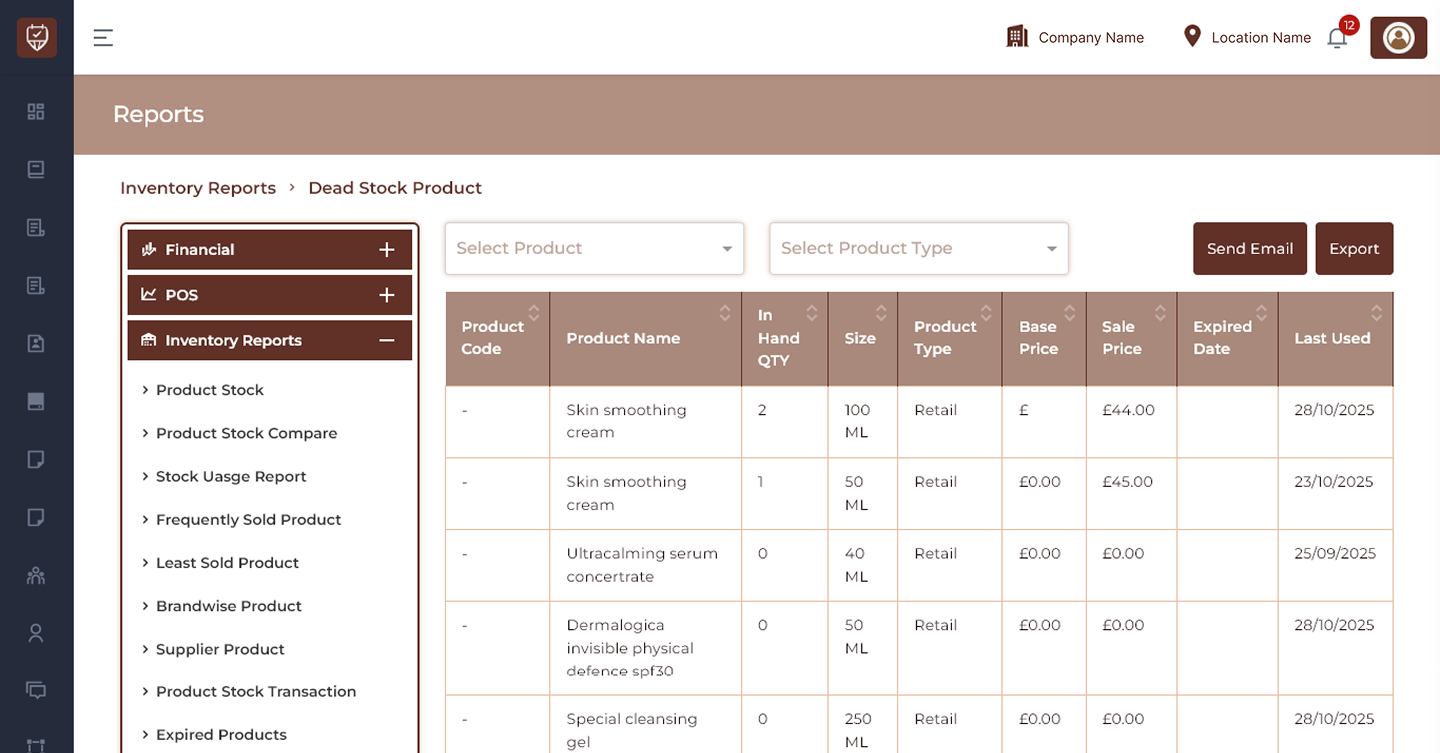
Product Filter
Allows users to display dead stock records for a selected product.
Features
- Search and select specific products.
- Narrow report results instantly.
- Improve product-level analysis.
- Reduce unnecessary data.
Purpose
Used to review dead stock performance for individual products.
Product Type Filter
Allows users to filter products by inventory classification.
Features
- Separate retail and professional products.
- Improve reporting clarity.
- Simplify inventory analysis.
Purpose
Used to review dead stock by product type.
Send Email
Sends the generated dead stock report.
Features
- Share inventory insights.
- Improve operational reporting.
- Enable remote access.
Purpose
Used to distribute report results.
Export
Downloads the currently displayed report.
Features
- Export filtered results.
- Support offline analysis.
- Maintain inventory records.
Purpose
Creates a downloadable report.
Product Details
Product Code
Displays the unique identifier assigned to the product.
Product Name
Displays the inventory product name.
In Hand QTY
Displays currently available stock quantity.
Size
Displays product size or packaging unit.
Examples:
- 15 ML
- 30 ML
- 40 ML
- 50 ML
- 100 ML
- 250 ML
Product Type
Displays the assigned inventory classification.
Examples:
- Retail
- Professional
Base Price
Displays the configured product base value.
Sale Price
Displays the current selling price.
Expired Date
Displays the product expiry date if available.
Last Used
Displays the most recent inventory usage or transaction date.
Features
- Identify slow-moving inventory.
- Monitor inactive stock.
- Review available stock quantities.
- Improve purchasing decisions.
- Reduce inventory waste.
Report Insights
This report helps identify products that remain in inventory without sufficient sales or usage activity.
Products with:
- High available quantity
- Low sales movement
- Old usage history
- Long inventory retention
may require review or replenishment adjustments.
Best Practices
- Review dead stock regularly.
- Reduce purchasing for inactive products.
- Create stock clearance plans.
- Monitor last used dates.
- Export reports for inventory planning.
- Use insights to optimise stock management.