
Treatment Reminder Settings
The Treatment Reminder Settings page allows administrators to configure automated reminders for customers who are due for their next treatment or service. These reminders help improve customer retention, encourage repeat bookings, and ensure customers maintain their recommended treatment schedules.
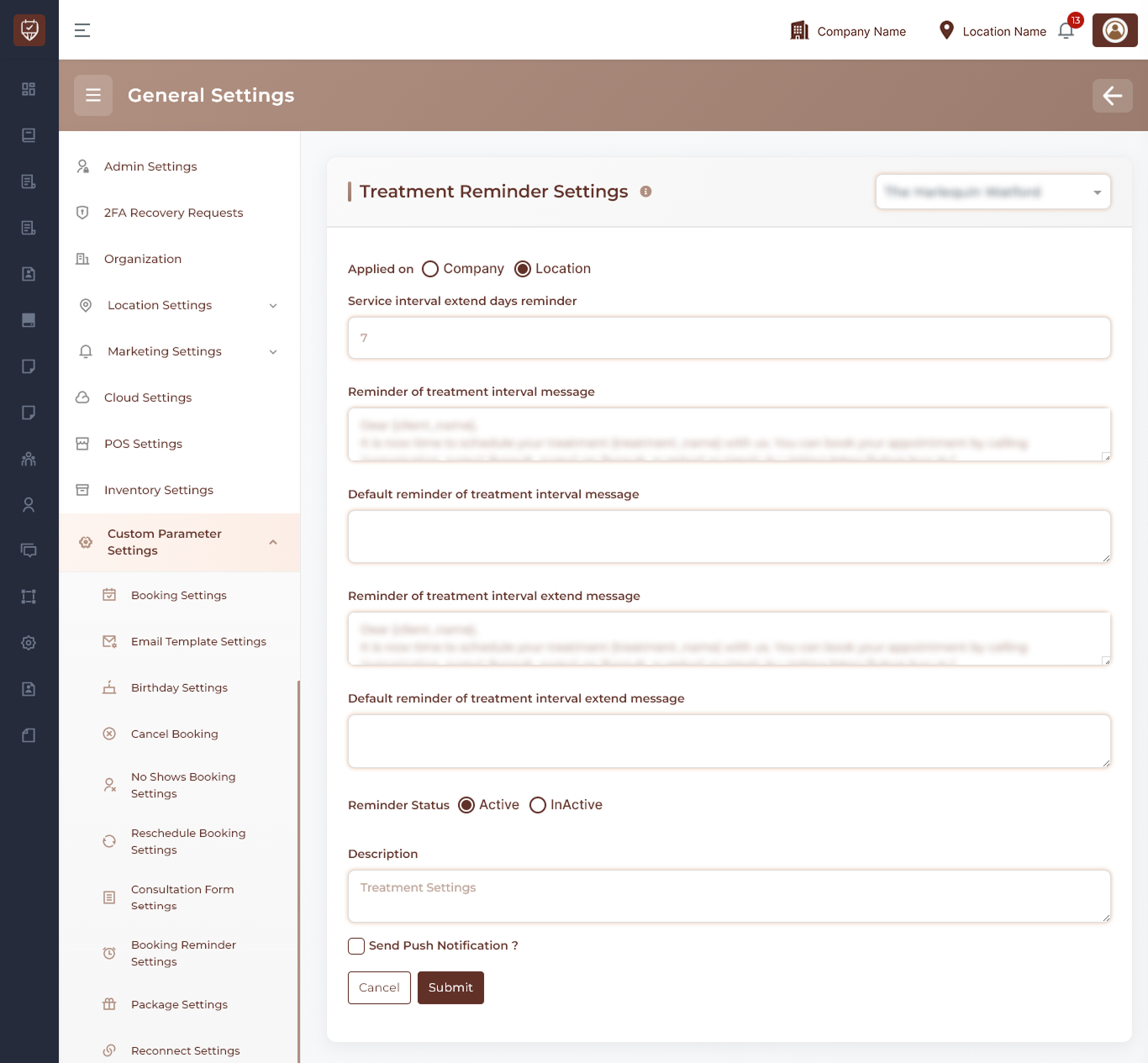
Scope Selection
Choose where the settings should apply:
- Company Level – Applies treatment reminder settings across all locations.
- Location Level – Applies treatment reminder settings only to the selected location.
Usage
Use company-level settings for a consistent treatment reminder strategy across the organization, or location-level settings when individual locations require customized reminder schedules.
Service Interval Reminder Configuration
Configure when customers should receive reminders based on treatment intervals.
Features
- Define the number of days before a treatment interval reminder is sent.
- Automatically identify customers due for a follow-up treatment.
- Encourage repeat bookings.
- Improve treatment plan compliance.
Usage
Treatment interval reminders help customers stay on schedule and maintain the effectiveness of their treatments.
Treatment Interval Reminder Message
Configure the notification sent when a customer is due for their next treatment.
Features
- Create personalized treatment reminders.
- Encourage customers to book their next appointment.
- Promote continued engagement with services.
- Support automated customer communication.
Usage
Reminder messages should clearly communicate that the customer is due for a follow-up treatment and provide booking instructions.
Default Treatment Reminder Message
Configure fallback content used when a custom reminder message is unavailable.
Features
- Ensures reminders can still be delivered.
- Maintains communication consistency.
- Supports uninterrupted automated notifications.
Usage
Default messages act as backup content for treatment reminder campaigns.
Treatment Interval Extension Reminder
Configure reminders for customers who have exceeded their recommended treatment interval.
Features
- Notify customers who are overdue for treatment.
- Encourage customers to re-engage with services.
- Reduce customer inactivity.
- Support ongoing treatment adherence.
Usage
Extension reminders are useful for reconnecting with customers who have delayed or missed their recommended treatment schedule.
Default Extension Reminder Message
Configure fallback content used when a treatment extension reminder message is unavailable.
Features
- Provides backup messaging for overdue treatment notifications.
- Ensures communication continuity.
- Maintains customer engagement efforts.
Usage
Default extension reminders help guarantee that overdue treatment communications are always delivered.
Reminder Status Management
Control whether treatment reminders are active.
Features
- Enable treatment reminder notifications.
- Disable treatment reminder notifications temporarily.
- Preserve reminder configurations while inactive.
- Activate reminders when required.
Usage
Status controls provide flexibility when managing treatment reminder campaigns.
Push Notification Settings
Control whether treatment reminders are also delivered through push notifications.
Features
- Send reminders directly to supported mobile devices.
- Improve notification visibility.
- Increase customer engagement.
- Complement email and SMS reminder channels.
Usage
Push notifications can improve reminder delivery effectiveness and encourage faster customer response.
Description
Provide an internal summary of the treatment reminder configuration.
Features
- Supports administrative documentation.
- Helps identify reminder policies.
- Assists with future maintenance and auditing.
- Provides context for administrators reviewing settings.
Usage
Descriptions are intended for internal reference and are not visible to customers.
Actions
- Submit : Saves all treatment reminder settings and activates the configured reminder schedule.
- Cancel : Discards unsaved changes and restores the current configuration.
Best Practices
- Configure reminder intervals based on the recommended treatment cycle.
- Keep reminder messages clear, professional, and action-oriented.
- Use extension reminders to re-engage customers who have missed follow-up treatments.
- Enable push notifications when supported by your customer communication strategy.
- Review reminder performance regularly and adjust schedules as needed.