
Email Template Settings
The Email Template Settings page allows administrators to configure branding, communication links, booking template content, informational notes, and promotional content used within customer email communications. Settings can be applied at either the company level or location level.
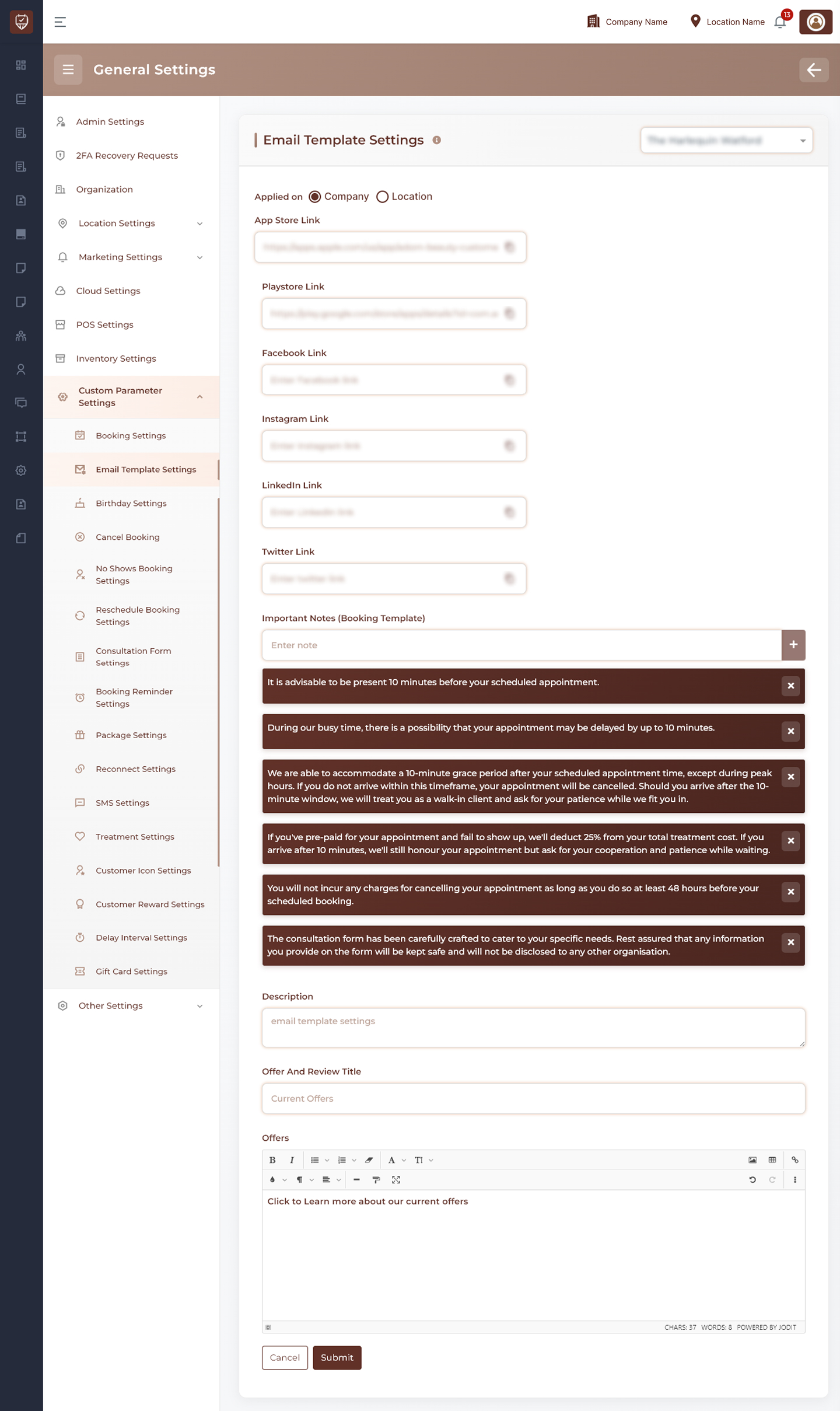
Scope Selection
Choose whether the settings should be applied at:
- Company Level – Applies the configuration across all locations.
- Location Level – Applies the configuration only to the selected location.
Application & Social Media Links
Configure links that may be included within customer communications.
Features
- Mobile application download links.
- Social media profile links.
- Business profile and marketing links.
- Centralized management of customer-facing URLs.
Usage
These links can be used to direct customers to mobile applications, social channels, or other business resources directly from email communications.
Important Notes
Maintain a list of informational notes that can be included in booking-related communications.
Features
- Add multiple notes.
- Remove outdated notes.
- Display important customer information consistently.
- Centralized management of booking instructions and reminders.
Usage
Useful for appointment policies, preparation instructions, arrival guidance, cancellation information, and other customer notices.
Template Description
Provides a summary or internal description for the email template configuration.
Features
- Centralized template identification.
- Helps administrators understand the purpose of the configured template.
- Supports template organization and maintenance.
Offers & Promotions
Manage promotional content displayed within email templates.
Features
- Define a promotional section title.
- Create and format marketing content using the rich text editor.
- Highlight current offers, discounts, packages, or seasonal campaigns.
- Maintain consistent promotional messaging across customer emails.
Usage
Promotional content can be updated periodically to support marketing campaigns and customer engagement initiatives.
Rich Text Editor
The content editor supports advanced formatting options for email content.
Features
- Text formatting and styling.
- Lists and structured content.
- Hyperlinks and promotional content formatting.
- Consistent presentation across email communications.
Actions
- Submit : Saves all email template settings and updates future email communications with the configured content.
- Cancel : Discards unsaved changes and restores the current configuration.
Best Practices
- Keep communication links current and valid.
- Review customer-facing notes regularly.
- Ensure promotional content is accurate and up to date.
- Use clear and concise messaging for improved customer experience.
- Maintain consistent branding across all email communications.