
Reconnect Settings
The Reconnect Settings page allows administrators to automatically target inactive customers with special offers and reminders. These settings help encourage returning visits by providing discounts and personalized reconnect communications to customers who have not booked or visited within a specified period.
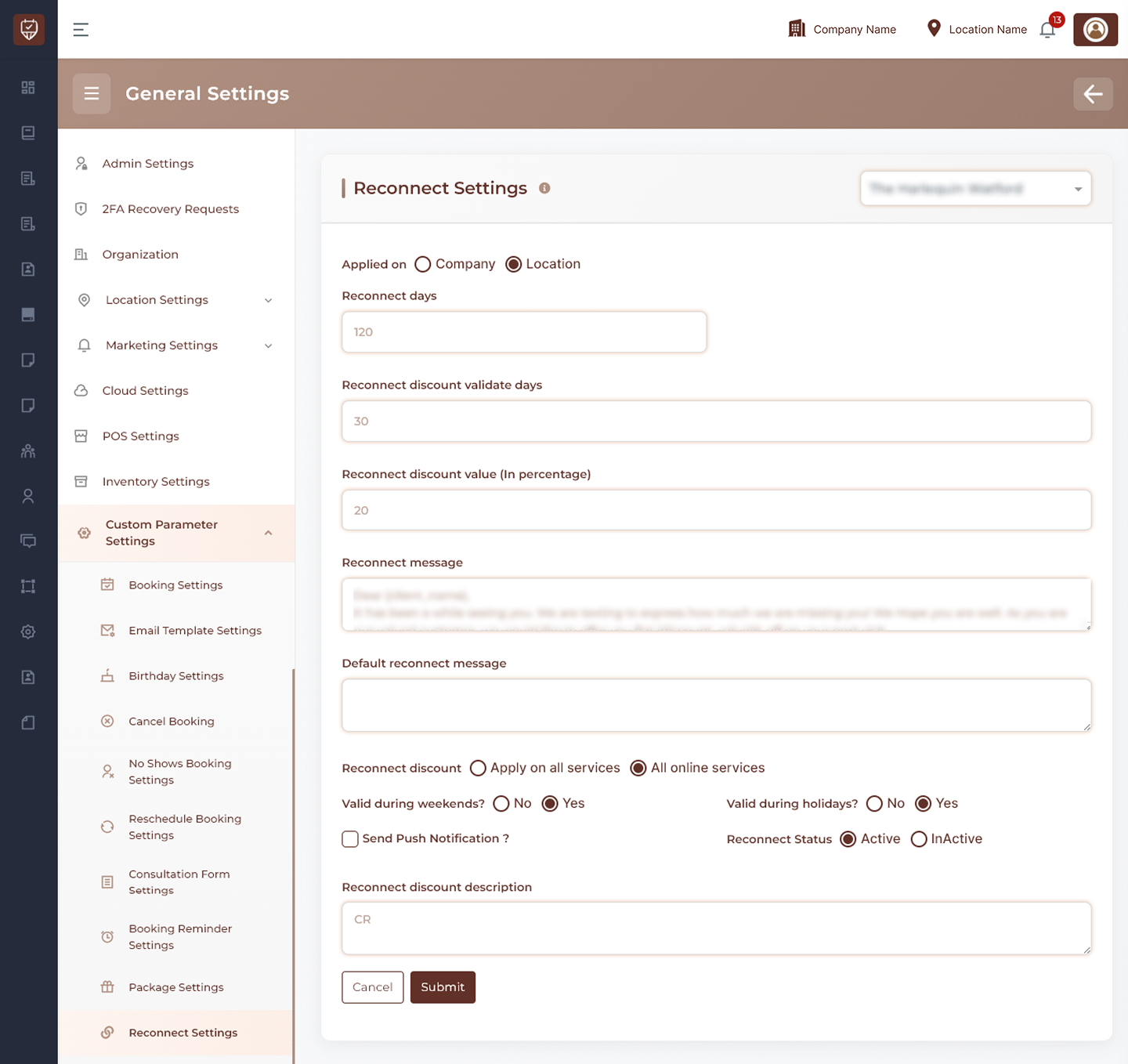
Scope Selection
Choose where the settings should apply:
- Company Level – Applies reconnect settings across all locations.
- Location Level – Applies reconnect settings only to the selected location.
Usage
Use company-level settings for a consistent customer retention strategy across the business, or location-level settings when individual locations require unique reconnect campaigns.
Reconnect Eligibility Settings
Configure when a customer becomes eligible for a reconnect campaign.
Features
- Define the number of inactive days before a customer qualifies for a reconnect offer.
- Automatically identify inactive customers.
- Support customer retention initiatives.
- Improve re-engagement opportunities.
Usage
Customers who have not visited within the configured period can be included in reconnect marketing campaigns.
Reconnect Discount Validity
Configure how long reconnect offers remain valid after being issued.
Features
- Define the number of days a reconnect discount remains active.
- Encourage timely customer action.
- Control promotion lifecycles.
- Prevent outdated offers from remaining active indefinitely.
Usage
Validity periods create urgency and help improve campaign effectiveness.
Reconnect Discount Configuration
Configure the promotional discount offered to returning customers.
Features
- Define the reconnect discount percentage.
- Encourage repeat visits.
- Increase customer retention.
- Support targeted promotional campaigns.
Usage
Reconnect discounts provide an incentive for inactive customers to return and book services.
Reconnect Messaging
Configure the communication sent to customers when they become eligible for a reconnect offer.
Features
- Create personalized reconnect messages.
- Inform customers about available discounts.
- Encourage rebooking and engagement.
- Support automated customer retention workflows.
Usage
Messages should be friendly, welcoming, and focused on encouraging customers to return.
Default Reconnect Message
Configure fallback content used when a custom reconnect message is unavailable.
Features
- Ensures reconnect campaigns always contain message content.
- Provides communication consistency.
- Supports uninterrupted automated notifications.
Usage
Default messages act as backup communication templates for reconnect campaigns.
Discount Application Settings
Control where reconnect discounts can be applied.
Features
- Apply discounts to all services.
- Restrict discounts to online services only.
- Support different promotional strategies.
- Control offer availability.
Usage
Choose the option that best aligns with your customer retention and marketing objectives.
Validity Rules
Configure when reconnect discounts can be redeemed.
Features
- Allow or restrict discounts during weekends.
- Allow or restrict discounts during holidays.
- Control promotional redemption periods.
- Support seasonal business policies.
Usage
Validity rules help ensure discounts are available only during approved operating periods.
Push Notification Settings
Control whether reconnect notifications are also delivered through push notifications.
Features
- Send reconnect offers directly to supported mobile devices.
- Increase customer visibility of promotions.
- Improve customer engagement.
- Complement email and SMS campaigns.
Usage
Push notifications can improve customer response rates and reconnect campaign effectiveness.
Reconnect Status Management
Control whether reconnect campaigns are active.
Features
- Enable reconnect campaigns.
- Disable reconnect campaigns temporarily.
- Preserve configuration settings while inactive.
- Activate campaigns when required.
Usage
Status controls provide flexibility when managing customer retention initiatives.
Description
Provide an internal summary of the reconnect campaign configuration.
Features
- Supports administrative documentation.
- Helps identify reconnect campaign objectives.
- Assists with future maintenance and auditing.
Usage
Descriptions are intended for internal reference and are not visible to customers.
Actions
- Submit : Saves all reconnect settings and activates the configured reconnect campaign.
- Cancel : Discards unsaved changes and restores the current configuration.
Best Practices
- Set reconnect periods that align with your typical customer visit frequency.
- Use attractive but sustainable discount percentages.
- Keep reconnect messages personalized and customer-focused.
- Enable push notifications to maximize campaign visibility.
- Regularly review campaign performance and adjust settings as needed.