
System Setting
The System Setting page provides access to configuration change history across the platform. It helps administrators monitor updates made to system settings, track who made changes, identify affected modules, and review modified fields.
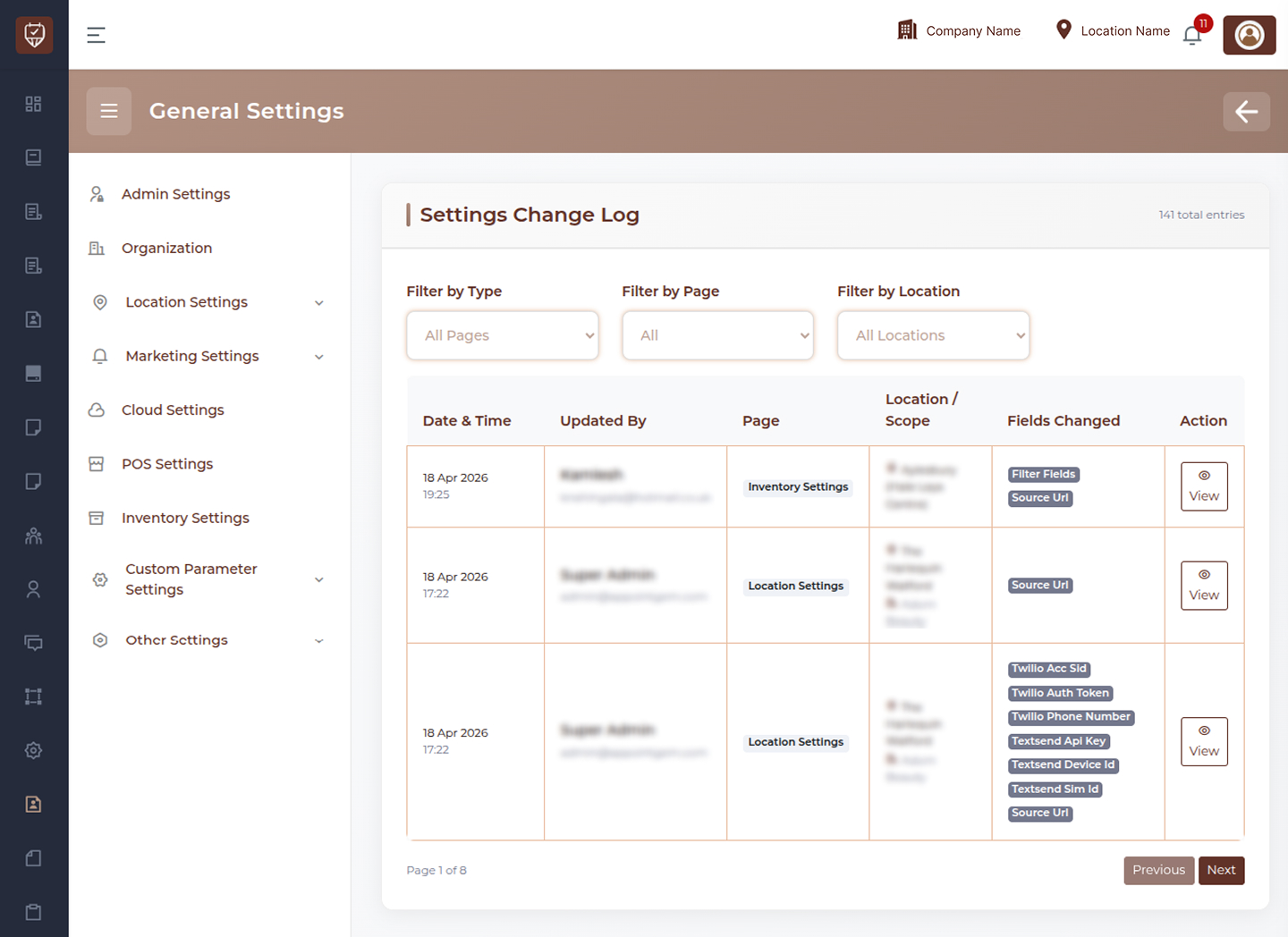
Filters
Filter by Type
Use this dropdown to filter logs by setting category or module type.
Examples:
- Booking Settings
- WhatsApp Settings
- Location Settings
- Inventory Settings
- Admin Settings
Filter by Page
Use this filter to display changes made on a specific settings page.
Filter by Location
Use this dropdown to view changes related to a specific branch, location, or scope.
Date & Time
Displays the exact date and time when the setting change was recorded.
Updated By
Shows the user or administrator who made the update.
Page
Displays the settings page or module where the change occurred.
Examples:
- Booking Settings
- WhatsApp Settings
- Location Settings
- Inventory Settings
Location / Scope
Shows where the update was applied.
Examples:
- Company Level
- Branch Level
- Specific Location
Fields Changed
Displays the individual fields or configuration values that were modified during the update.
Examples:
- Booking Message
- SMS Settings
- Access Token
- Source URL
- Provider Settings
Action
Provides options to review detailed change history.
- View : Open complete audit details for that record
Best Practices
- Regularly review logs for important configuration updates
- Use filters to quickly find relevant changes
- Monitor sensitive settings such as messaging, booking, and integrations
- Use logs for troubleshooting unexpected behavior
- Maintain audit records for accountability and compliance
View Change Details
The Change Details popup provides a complete audit summary for a selected system setting update. It allows administrators to review what was changed, who made the update, where it was applied, and compare previous values with new values.
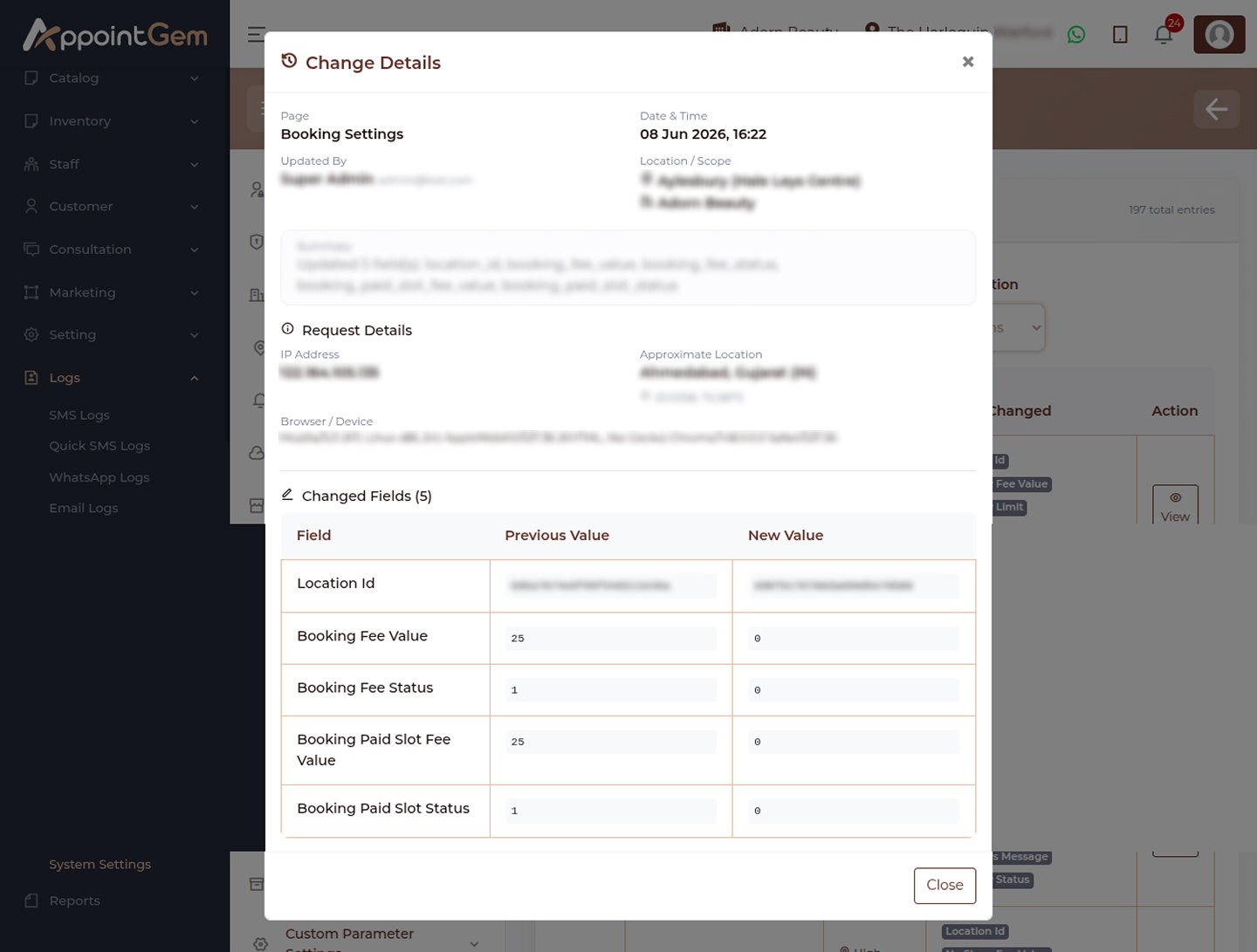
Page
Displays the settings page or module where the update was made.
Examples:
- Booking Settings
- WhatsApp Settings
- Location Settings
- Inventory Settings
Date & Time
Shows the exact date and time when the update was saved.
Updated By
Displays the administrator or user who performed the change.
Location / Scope
Shows where the setting update was applied.
Examples:
- Company Level
- Branch Level
- Specific Location
Changed Fields Section
This section lists all modified fields included in the selected update.
Field
Displays the name of the setting that was changed.
Examples:
- Booking Message
- Description
- Provider
- Access Token
- Status
Previous Value
Shows the value before the update was applied.
New Value
Shows the updated value after the change was saved.
Comparison Purpose
Use this section to quickly identify:
- What setting was modified
- Old vs new values
- Text changes in templates or messages
- Configuration updates to integrations
- Status or feature changes
Actions
- Close : Exit the popup window
Best Practices
- Review value changes before troubleshooting issues
- Compare old and new content for message templates
- Verify sensitive updates such as tokens or provider settings
- Use audit history to track accidental changes
- Maintain transparency across admin updates