
POS Receipt
The Receipt Report page provides detailed visibility into generated POS receipts during the selected reporting period. It helps administrators review completed sales, track refunds, monitor payment methods, and validate receipt-level transaction activity.
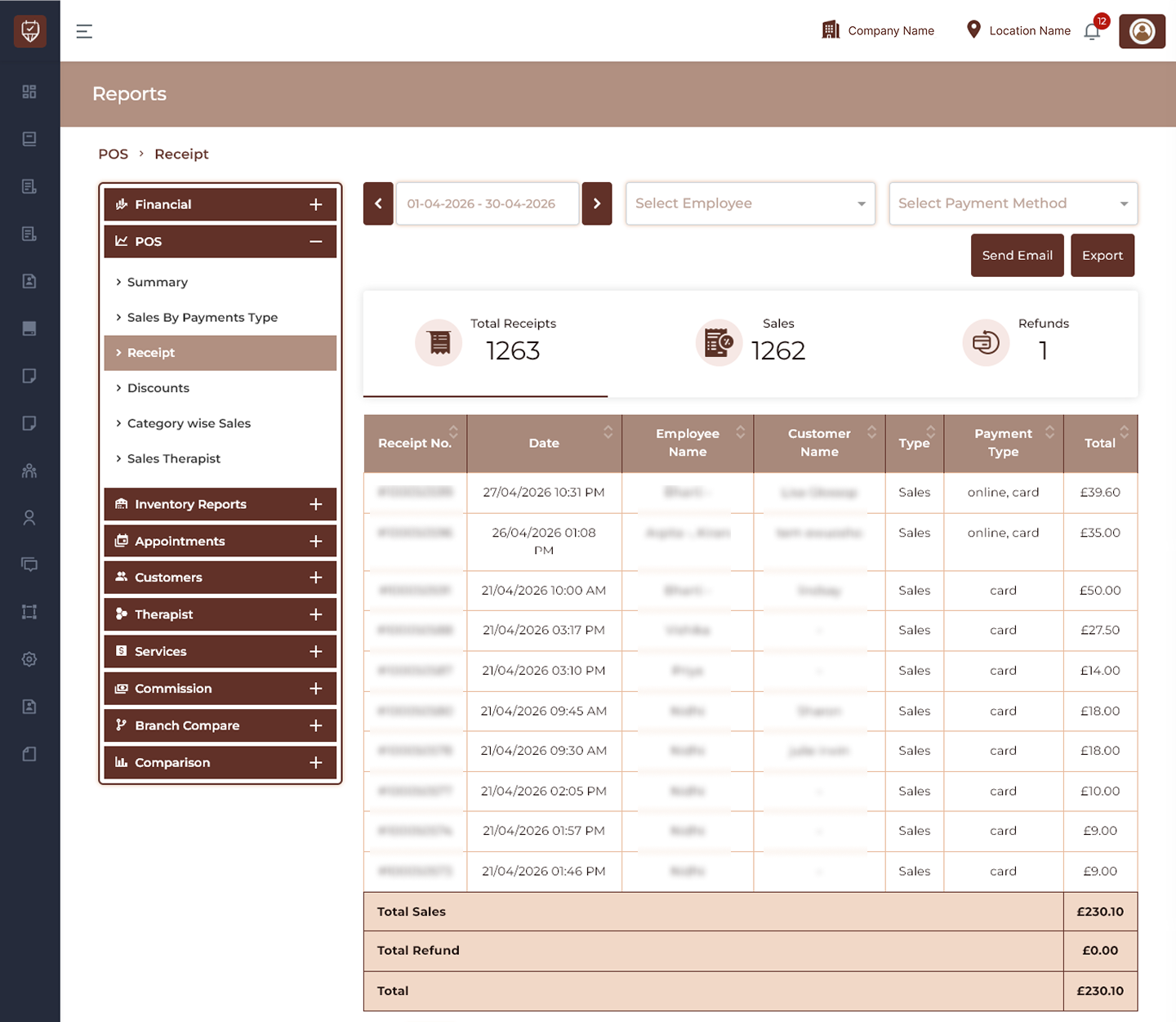
Date Range Filter
Allows users to select the reporting period for receipt analysis.
Features
- Filter receipt records by selected dates.
- Navigate between previous and next periods.
- Refresh report results dynamically.
- Support historical receipt review.
Purpose
Used to analyze receipt activity within a selected timeframe.
Employee Filter
Allows receipt records to be filtered for a selected employee.
Features
- Search and select employee records.
- Display employee-related receipts.
- Simplify performance analysis.
- Improve report precision.
Purpose
Used to review receipt activity by employee.
Payment Method Filter
Allows receipt records to be filtered based on payment type.
Features
- Display payment-specific receipt data.
- Narrow report results.
- Improve financial visibility.
- Support payment analysis.
Purpose
Used to review receipts for selected payment methods.
Send Email
Sends the generated receipt report to configured recipients.
Features
- Share receipt reports electronically.
- Support reporting workflows.
- Enable remote access to reporting data.
- Improve collaboration.
Purpose
Used to distribute receipt information through email.
Export
Downloads the currently displayed receipt report.
Features
- Export filtered receipt data.
- Generate downloadable reports.
- Support auditing and reconciliation.
- Enable offline reporting.
Purpose
Creates an exportable version of receipt data.
Receipt Overview
Displays receipt performance indicators.
Total Receipts
Displays the total number of generated receipts.
Sales
Displays completed sales transactions.
Refunds
Displays refunded transactions.
Features
- Review receipt volume.
- Monitor completed sales.
- Track refund activity.
- Evaluate operational performance.
Receipt Details
Displays detailed receipt-level transaction information.
Receipt No.
Displays the unique receipt reference number.
Date
Displays receipt creation date and time.
Employee Name
Displays the employee associated with the receipt.
Customer Name
Displays the customer linked to the receipt.
Type
Displays the transaction category.
Example:
- Sales
Payment Type
Displays the payment methods used.
Examples:
- Card
- Online
- Cash
- Multiple payment methods
Total
Displays the final transaction amount.
Features
- Review receipt-level transactions.
- Monitor employee performance.
- Validate payment information.
- Analyze sales activity.
Receipt Totals
Displays cumulative financial totals.
Total Sales
Displays total completed sales value.
Total Refund
Displays total refunded value.
Total
Displays final transaction totals after calculations.
Features
- Calculate sales performance.
- Review refund impact.
- Verify transaction totals.
- Support financial reconciliation.
Best Practices
- Apply date filters before exporting reports.
- Review payment methods regularly.
- Monitor refund activity.
- Validate receipt totals during reconciliation.
- Export reports periodically for record keeping.