
Stock Usage Detail
The Stock Usage Detail report provides visibility into product consumption during the selected reporting period. It helps monitor inventory usage, identify frequently consumed products, and support stock replenishment planning.
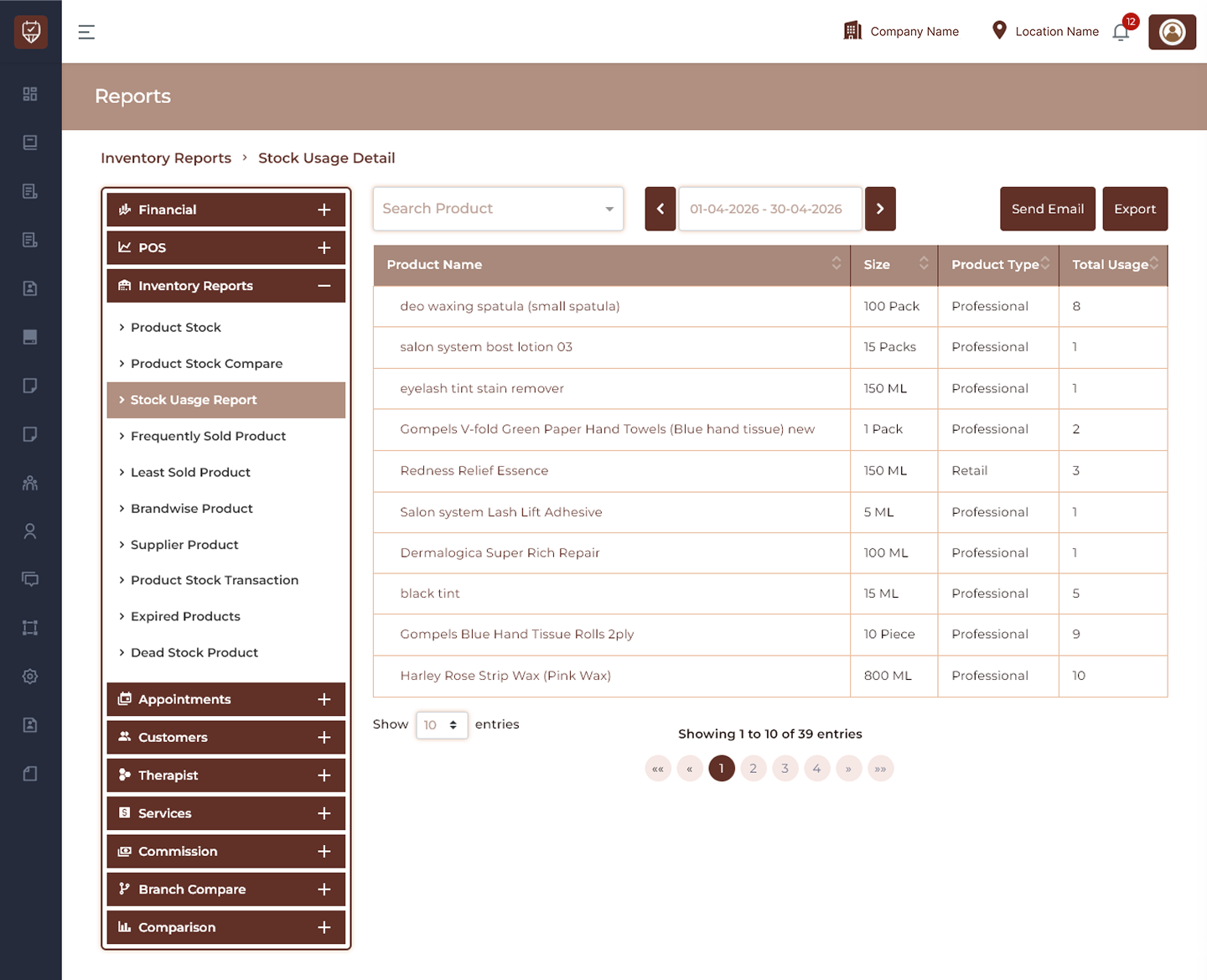
Product Filter
Allows users to search and view stock usage details for a selected product.
Features
- Search products directly.
- Display product-specific usage records.
- Reduce unnecessary report data.
- Improve inventory analysis.
Purpose
Used to review usage trends for individual products.
Date Range Filter
Allows users to define the reporting period for stock usage analysis.
Features
- Filter usage records by selected dates.
- Compare consumption over time.
- Refresh report results dynamically.
- Support historical inventory review.
Purpose
Used to analyze product consumption during a selected period.
Send Email
Sends the generated stock usage report to recipients.
Features
- Share usage reports electronically.
- Support inventory reporting.
- Improve communication between teams.
Purpose
Used to distribute stock usage reports.
Export
Downloads the currently displayed stock usage report.
Features
- Export filtered usage data.
- Support offline analysis.
- Maintain inventory records.
Purpose
Creates a downloadable stock usage report.
Stock Usage Details
Product Name
Displays the name of the consumed product.
Size
Displays product packaging size or unit.
Product Type
Displays the assigned product classification.
Total Usage
Displays total quantity consumed during the selected period.
Features
- Monitor inventory consumption.
- Identify frequently used products.
- Improve purchasing decisions.
- Support stock planning and replenishment.
Best Practices
- Review stock usage regularly to maintain healthy inventory levels.
- Track high-consumption products to prevent shortages.
- Compare usage across reporting periods.
- Export reports for inventory review and forecasting.
- Use product filters to focus on specific inventory items.