
Brandwise Product
The Brandwise Product report provides inventory visibility grouped by product brands. It helps monitor available stock across brands, review inventory distribution, and support purchasing and replenishment decisions.
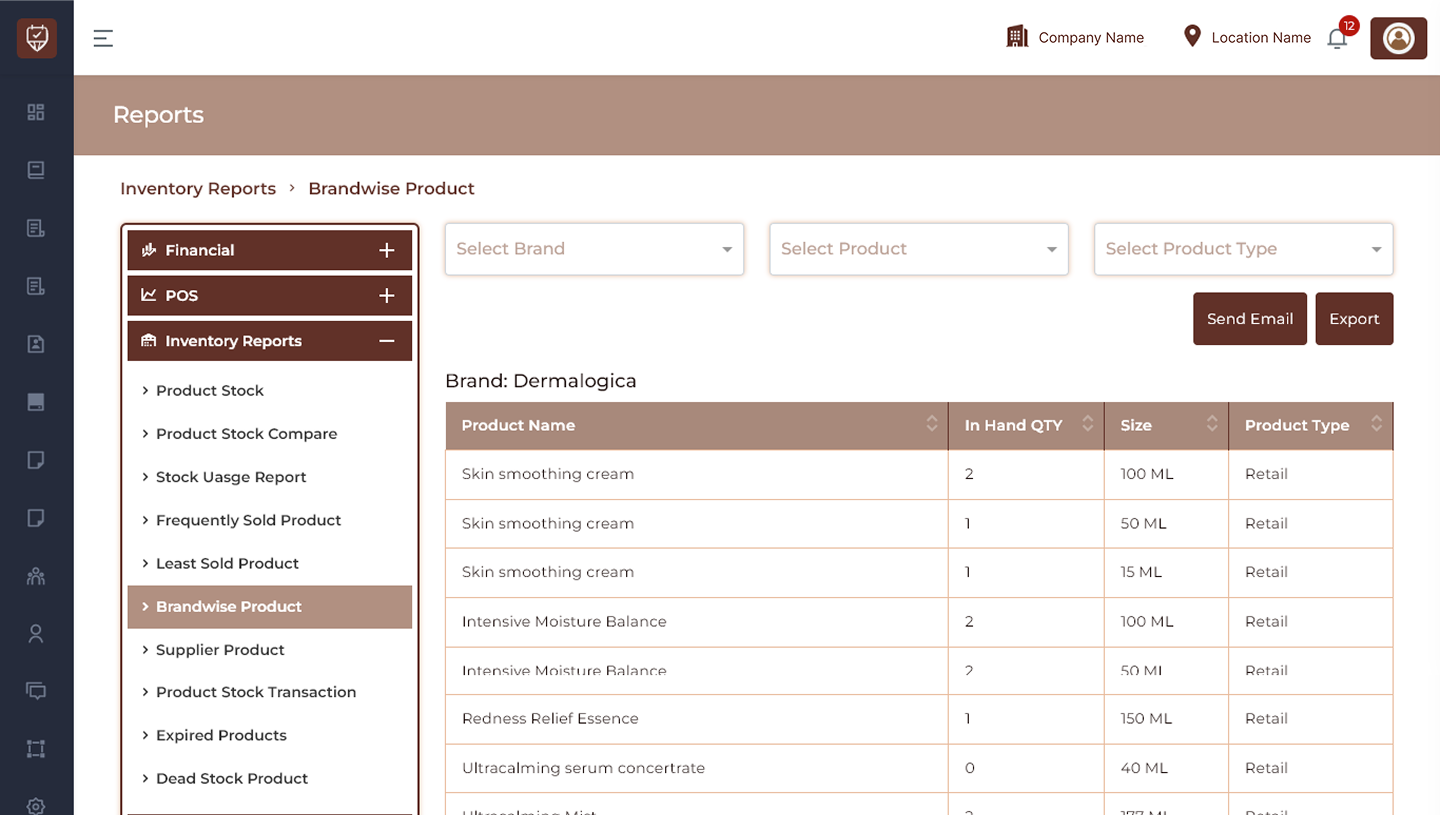
Brand Filter
Allows users to display inventory records for a selected brand.
Features
- Display products for a selected brand.
- Review inventory grouped by brand.
- Improve inventory visibility.
- Support brand-level stock analysis.
Purpose
Used to analyse stock availability for specific brands.
Product Filter
Allows users to narrow report results to a selected product.
Features
- Search and select products.
- Display product-specific inventory.
- Simplify stock analysis.
- Improve report accuracy.
Purpose
Used to review inventory details for selected products.
Product Type Filter
Filters inventory records by product classification.
Features
- Separate retail and professional inventory.
- Improve reporting clarity.
- Support inventory segmentation.
Purpose
Used to analyse stock by product type.
Send Email
Sends the generated brandwise inventory report.
Features
- Share inventory reports.
- Improve operational communication.
- Enable remote review.
Purpose
Used to distribute report results.
Export
Downloads the currently displayed report.
Features
- Export filtered inventory data.
- Support offline reporting.
- Maintain stock records.
Purpose
Creates a downloadable inventory report.
Brand Sections
Products are grouped and displayed under their assigned brands.
Features
- Organised inventory presentation.
- Easy brand comparison.
- Improved stock visibility.
- Faster inventory review.
Purpose
Used to review stock grouped by brand.
Product Details
Product Name
Displays the product name.
In Hand QTY
Displays the currently available inventory quantity.
Size
Displays product packaging size or measurement.
Examples:
- 50 ML
- 80 ML
- 250 ML
- 500 ML
- 1000 ML
- 850 gram
Product Type
Displays the assigned inventory classification.
Examples:
- Professional
- Retail
Features
- Review inventory by brand.
- Monitor stock availability.
- Compare products across brands.
- Improve replenishment decisions.
Best Practices
- Review brand inventory regularly.
- Monitor low stock quantities.
- Compare stock distribution across brands.
- Export reports for inventory tracking.
- Use inventory insights for purchasing decisions.