
Customer Rewards Report
The Customer Rewards report provides visibility into customers who redeemed rewards or loyalty points during the selected reporting period. It helps track reward usage, measure customer engagement, and evaluate promotional effectiveness.
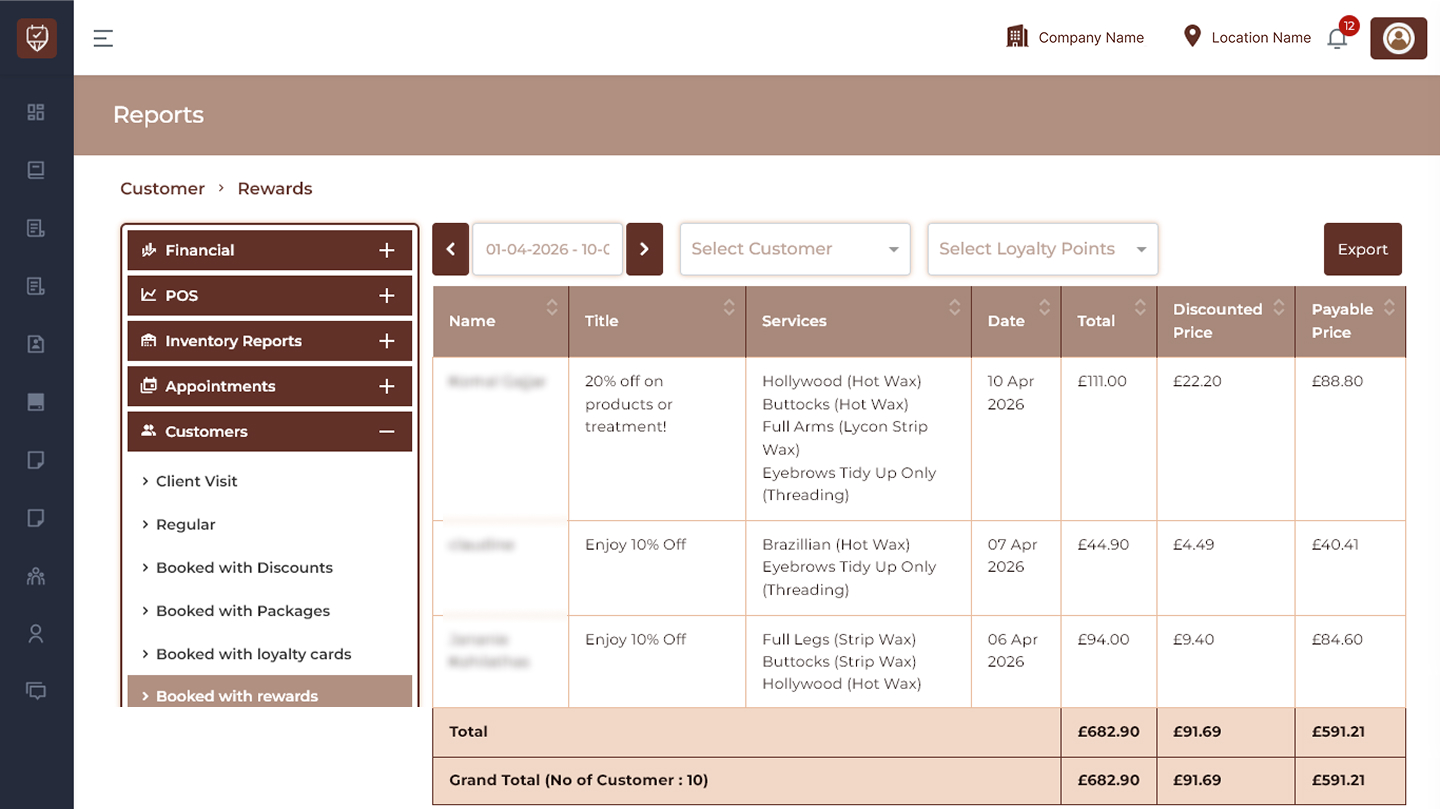
Date Range Filter
Allows users to display reward redemption records for a selected reporting period.
Features
- Filter reward transactions by date range.
- Monitor redemption activity.
- Analyse customer reward usage.
- Improve reporting visibility.
Purpose
Used to review customer reward activity during a selected period.
Customer Filter
Filters report data for selected customers.
Features
- Search and select customers.
- Display customer-specific reward activity.
- Improve customer-level reporting.
- Simplify analysis.
Purpose
Used to review reward redemption history for individual customers.
Loyalty Points Filter
Allows users to filter report results using selected loyalty point rewards.
Features
- Search and select loyalty rewards.
- Display bookings completed using rewards.
- Improve redemption tracking.
- Support reward performance analysis.
Purpose
Used to analyse customer reward utilisation.
Export
Downloads the currently displayed report.
Features
- Export filtered reward records.
- Support offline analysis.
- Maintain reporting history.
- Simplify operational review.
Purpose
Creates a downloadable customer rewards report.
Reward Details
Name
Displays the customer name.
Title
Displays the reward or loyalty offer applied.
Services
Displays services booked using the reward.
Date
Displays the booking date.
Total
Displays the original booking amount.
Discounted Price
Displays the value reduced through reward redemption.
Payable Price
Displays the final amount payable after applying rewards.
Features
- Track reward redemption activity.
- Monitor promotional effectiveness.
- Analyse customer behaviour.
- Support loyalty program decisions.
Summary Section
Total
Displays the total value shown in the current results.
Grand Total (No of Customer)
Displays:
- Total number of customers.
- Combined booking amount.
- Total discounted value.
- Final payable amount.
Features
- Summarise reward performance.
- Measure customer participation.
- Improve reporting visibility.
Best Practices
- Monitor reward redemption regularly.
- Review discount effectiveness.
- Track customer engagement trends.
- Export reports for business analysis.
- Use insights to optimise reward programs.