
Branch Product Compare Report
The Branch Product Compare report provides visibility into product inventory and pricing across selected branches. It helps compare stock availability, product quantities, pricing structures, and product distribution to support inventory control and business decisions.
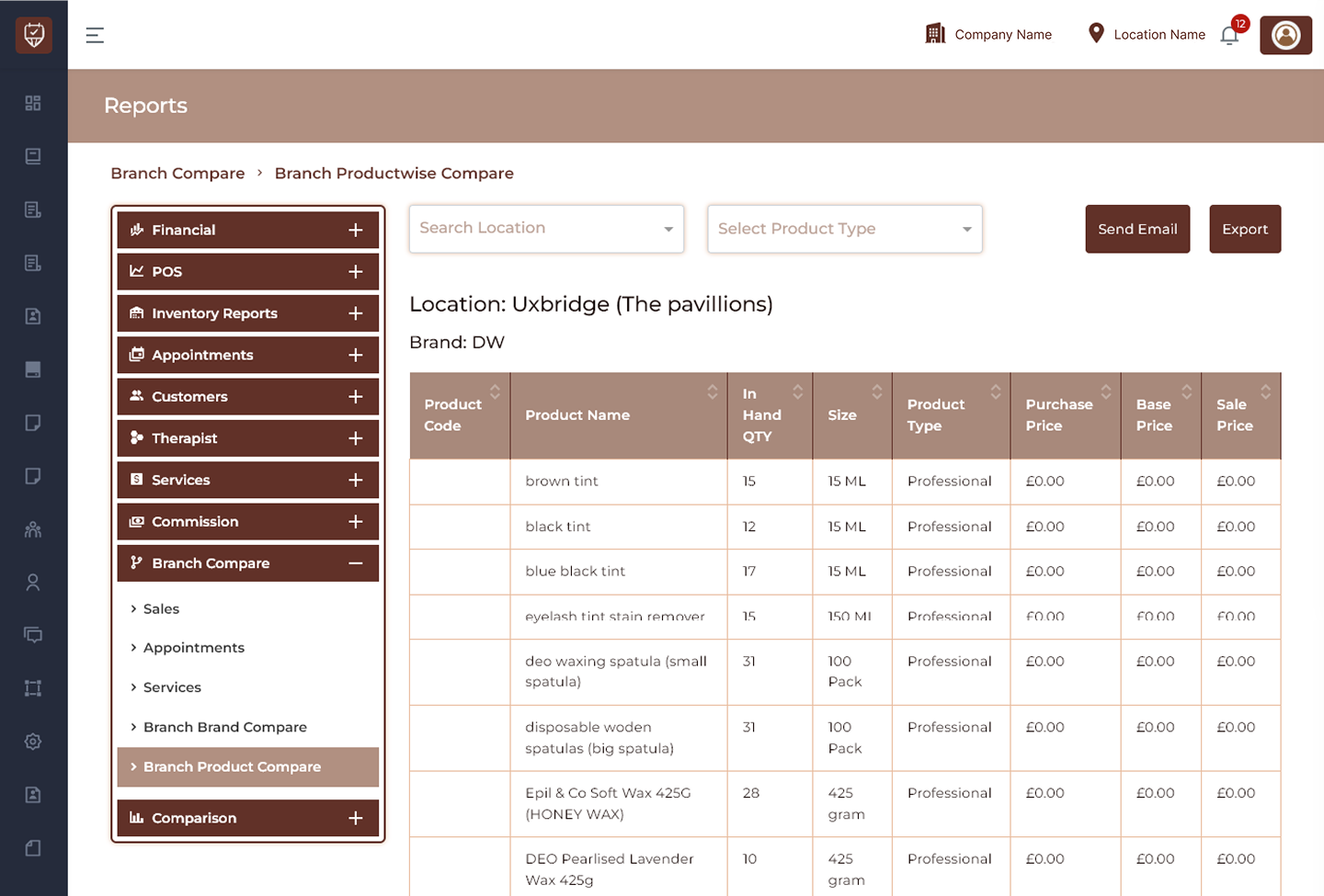
Search Location Filter
Allows users to filter product comparison data by branch location.
Features
- Search and select branch locations.
- Display branch-specific inventory records.
- Compare product availability between locations.
- Improve inventory analysis.
Purpose
Used to review product inventory for selected branches.
Select Product Type Filter
Allows users to filter inventory records by product category.
Features
- Filter products by type.
- Display targeted inventory results.
- Simplify inventory monitoring.
- Improve stock analysis.
Purpose
Used to evaluate products by category.
Send Email
Allows users to share inventory comparison reports.
Features
- Send reports directly through email.
- Share stock information with teams.
- Improve branch communication.
- Support operational reporting.
Purpose
Used for inventory collaboration and reporting.
Export
Allows users to export inventory comparison data.
Features
- Export inventory records.
- Download product comparison details.
- Generate audit-ready reports.
- Support operational reviews.
Purpose
Used to maintain inventory documentation.
Location Information
Displays the selected branch for product comparison.
Location
Displays the selected branch location.
Brand
Displays the selected product brand.
Product Comparison Summary Table
Displays detailed inventory and pricing information for products available in the selected branch.
Product Code
Displays the unique identifier assigned to the product.
Product Name
Displays the product available within the selected brand.
In Hand QTY
Displays the available stock quantity.
Size
Displays product size or packaging volume.
Product Type
Displays the category assigned to the product.
Purchase Price
Displays the cost price of the product.
Base Price
Displays the standard selling price before adjustments.
Sale Price
Displays the final selling price available for customers.
Features
- Compare product inventory across branches.
- Monitor available stock quantities.
- Analyse pricing structures.
- Track inventory distribution by location.
- Export and share product comparison reports.
Best Practices
- Review stock quantities regularly.
- Compare pricing across branches.
- Monitor inventory availability.
- Maintain accurate product records.
- Export reports for operational and inventory planning.