
Payment Transactions
The Payment Transactions page provides a centralized view of all customer payments processed through integrated payment gateways.
This page allows administrators to track transaction activity, review payment details, monitor settlement values, and export transaction records for financial reporting and reconciliation.
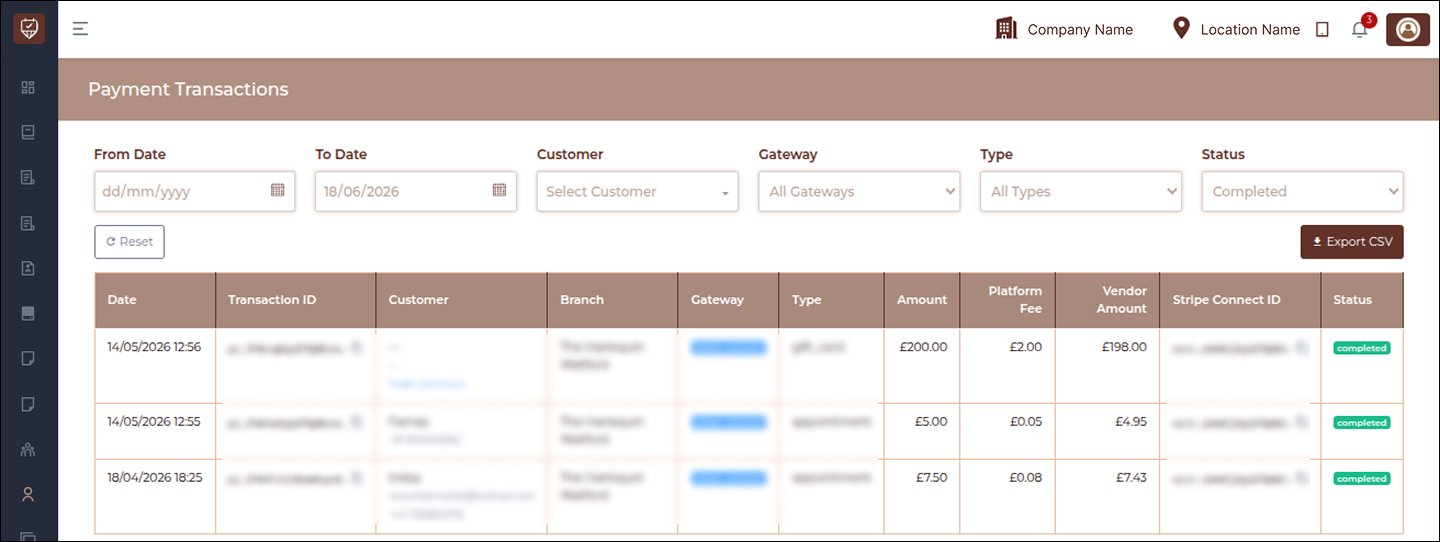
Overview
Payment Transactions provides complete visibility into payment processing across branches and services.
Users can:
- Monitor customer transactions
- Filter payment records
- Track payment gateways
- Review payment categories
- Verify settlement values
- Monitor transaction status
- Export payment reports
Filters
The report includes multiple filters to simplify transaction analysis.
From Date
Select the start date for transaction reporting.
Used to:
- Review historical transactions
- Generate period-based reports
- Limit report results
To Date
Select the end date for reporting.
Used to:
- Complete reporting periods
- Review recent transactions
- Generate accurate exports
Customer
Allows filtering transactions for a specific customer.
Used to:
- Review customer payment history
- Investigate payment activity
- Validate transaction records
Gateway
Filters records by payment provider.
Examples may include:
- Stripe
- Stripe Connect
- Other configured gateways
Used for payment reconciliation and gateway analysis.
Type
Allows filtering by transaction category.
Supported examples may include:
- Appointment
- Gift Card
- Product
- Package
- Service
Status
Allows filtering by transaction state.
Examples include:
- Completed
- Pending
- Failed
- Refunded
Reset
Clears all applied filters and restores the default report view.
Used when starting a new transaction search.
Export CSV
Exports the currently displayed transaction records.
Export includes:
- Applied filters
- Payment information
- Gateway details
- Settlement values
- Transaction status
Exports can be used for reconciliation and auditing purposes.
Transaction Details
The transaction listing displays detailed payment information.
Date
Displays the date and time when payment was processed.
Transaction ID
Displays the unique payment reference generated by the gateway.
Used for:
- Transaction verification
- Payment tracking
- Customer support investigations
Customer
Displays customer information associated with the payment.
May include:
- Customer name
- Contact information
- Customer code
Branch
Displays the branch associated with the payment.
Used for branch-level revenue tracking.
Gateway
Displays the payment provider used for processing.
Used for:
- Settlement review
- Gateway reconciliation
Type
Displays the category of payment.
Examples include:
- Appointment payment
- Gift card purchase
- Service payment
Amount
Displays the total payment amount submitted by the customer.
Represents the gross transaction value.
Platform Fee
Displays the fee charged by the payment platform.
Used for:
- Cost tracking
- Revenue calculations
Vendor Amount
Displays the final amount received after deductions.
Used to determine actual receivable value.
Stripe Connect ID
Displays settlement reference information generated by the gateway.
Used for:
- Payment validation
- Settlement reconciliation
Status
Displays the final transaction outcome.
Supported examples may include:
Completed
Payment processed successfully.
Pending
Payment is awaiting confirmation.
Failed
Transaction could not be completed.
Refunded
Payment has been returned.
Best Practices
- Apply date filters before exporting reports.
- Review payment channel distribution regularly.
- Use transaction filters to narrow analysis.
- Verify totals during reconciliation processes.
- Export reports periodically for financial records.